
How a Property Assessment Firm Automated Report Production
Field teams returned with inspection forms, photographs and notes. Office staff then renamed files, matched images to building systems and rebuilt the evidence inside a long client report.
- Proof basisMarket solution story
- IndustryCommercial Real Estate Services
- Year2026
- ServicesWorkflow Automation, System Integration, AI Automation
This is a market solution story built from Chronexa’s research into real businesses, roles, technology stacks and operating problems. It shows how we would engineer the system. It is not presented as a named client deployment, and no unverified savings or performance result is claimed.
The short answer
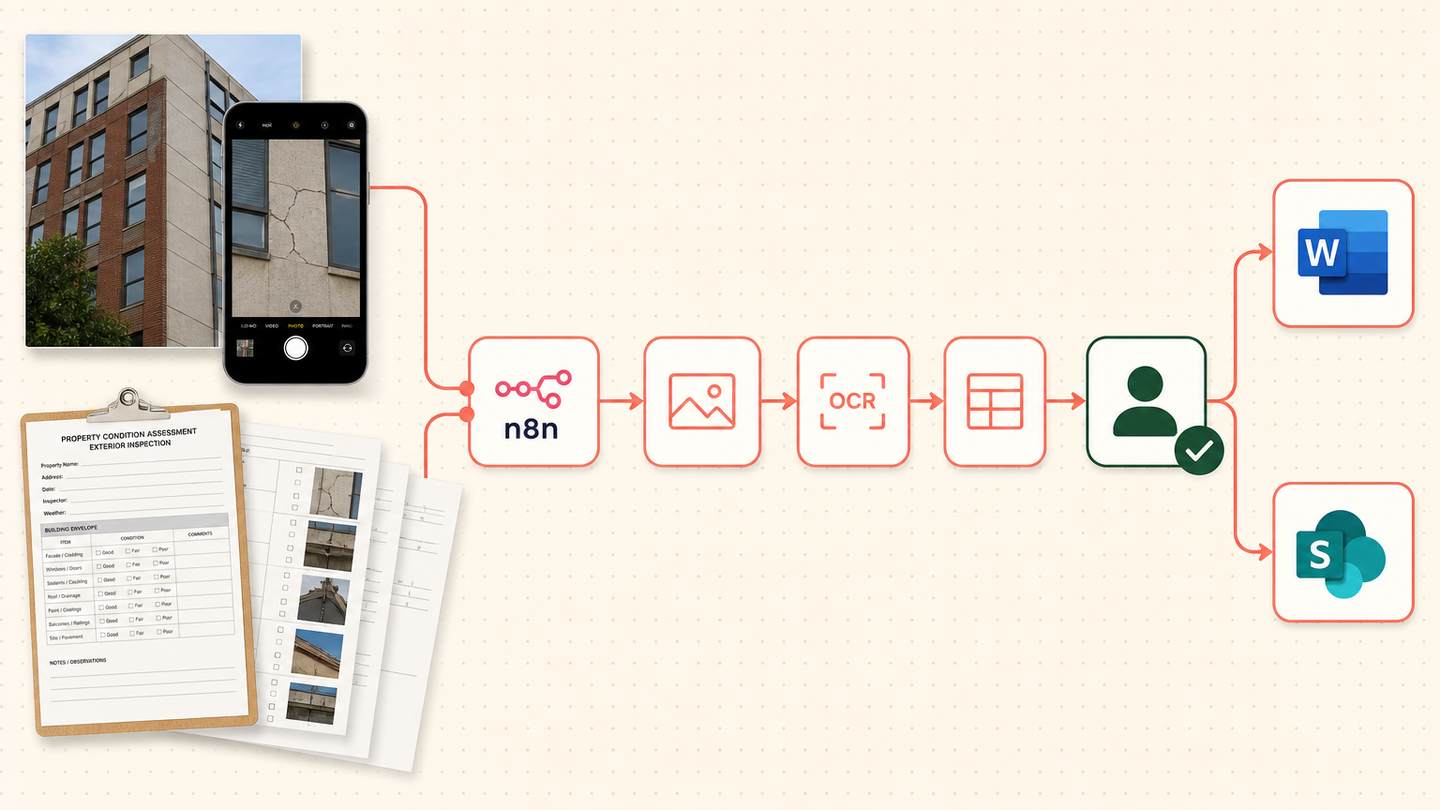
We designed a workflow that turns inspection forms, field notes and photographs into a structured property condition assessment report draft. n8n organises the evidence, document and vision models extract facts, and an assessor approves every condition and cost conclusion before Word and SharePoint receive the final package.
Tools and systems used
- Mobile inspection form
- n8n
- Azure AI Vision
- Azure Document Intelligence
- Microsoft Word
- SharePoint
- RSMeans data
The report was taking longer than the inspection
The field work was valuable professional judgment. The slow part came later: hundreds of files had to be named, placed and rewritten inside a standard report. A missing photograph could be discovered days after the site visit. Reviewers spent time checking formatting instead of the building conclusion.
The firm wanted to increase report capacity, but a rigid form product had already failed on inconsistent real-world packages. The new design had to expect incomplete notes and mixed photo quality.
How the workflow runs
- Receive the field package
Collect the form, notes and original photographs under one site identifier.
- Organise evidence
Match photos and observations to roof, structure, HVAC, electrical and other sections.
- Extract facts
Read dates, quantities, deficiencies and recommendations into a report schema.
- Check uncertainty
Route unmatched photos, unclear notes and conflicting quantities to the assessor.
- Build the draft
Populate the Word template with sections, tables, captions and source references.
- Approve and archive
An assessor signs off before the report and evidence package are stored in SharePoint.
The system we designed
A site identifier joins mobile forms, uploaded files and project metadata. n8n creates a manifest. Vision and document extraction services return structured observations with confidence and source references. Rules match them to the report template and hold exceptions for the assessor.
The Word document is generated only after required sections pass validation. Captions and tables include their source keys. SharePoint stores the report beside the original evidence so a reviewer can move from conclusion to source.
How the firm would judge it
Measure office write-up time, reports completed per month, unmatched evidence, reviewer corrections and turnaround from site visit to draft. The system should prove accuracy on the firm’s own historical reports before any capacity claim is used.
Why the workflow accepts messy inputs
The extraction schema supports repeated observations and missing values. It does not assume every field form is identical. The workflow can pause one section without discarding the rest of the project.
Why this topic deserves a page
DataForSEO showed 720 US monthly searches and keyword difficulty 0 for the core query. The sheet also contained a repeated, well-defined report-production pain across real property assessment businesses.
Safeguards and failure handling
- Every photo keeps its original file and site identifier.
- The system does not invent a condition from an image.
- Cost references show source and date.
- Unmatched or low-confidence evidence stops the section.
- A qualified assessor approves findings and recommendations.