
A Daily Meta Ads Report Built Around Decisions, Not Dashboards
Chronexa’s active reporting workflow reads account and campaign performance each morning, converts it into a compact operating summary and sends it to the team on WhatsApp.
- Proof basisRunning inside Chronexa
- IndustryPaid Media Operations
- Year2026
- ServicesMarketing Automation, Meta Ads API, WhatsApp Reporting
Verified from the active 9:00 AM reporting workflow and Chronexa’s campaign dataset. The report surfaces observed performance; it does not claim the workflow itself improved campaign results.
The short answer
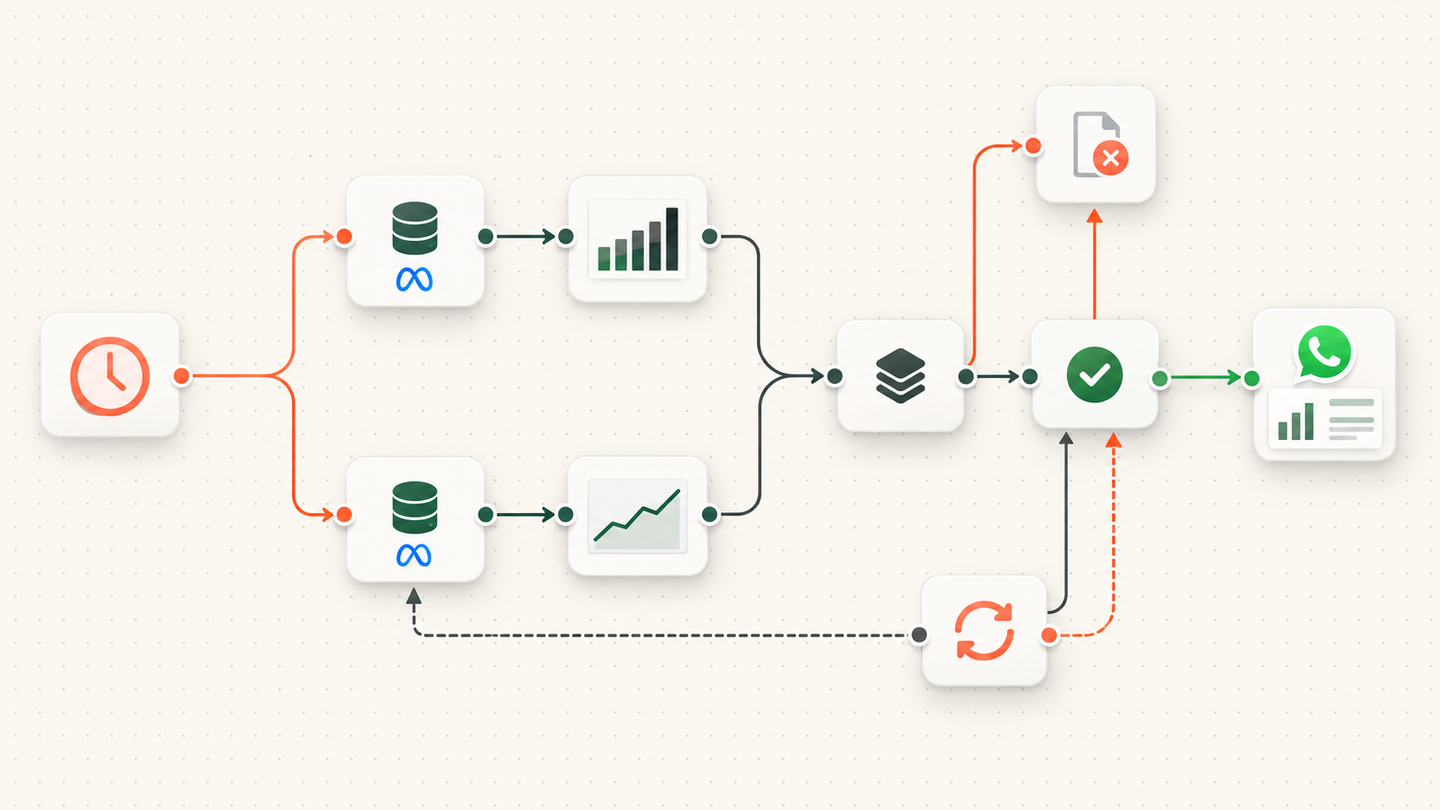
Chronexa runs an n8n report every morning at 9:00. It pulls account-level and campaign-level Meta Ads data, checks and summarises the numbers, then sends one compact WhatsApp report. The summary is built from the API values; it does not invent commentary when data is missing.
Tools and systems used
- n8n
- Meta Graph API
- Meta Ads Insights
- JavaScript aggregation
- WhatsApp Cloud API
- Scheduled trigger
The dashboard had data but no morning decision
Meta Ads Manager can answer almost any performance question, but a small team still needs to open it, select the right dates, compare campaigns and decide what changed. That routine is easy to postpone and difficult to make consistent.
The requirement was a short daily view that made poor economics visible without pretending to automate media-buying judgment.
Vanity metrics were not enough
The report needed cost, delivery and conversion context at both account and campaign level. A cheap lead could not be allowed to look successful when downstream quality was poor.
How the workflow runs
- Start at 9:00
A scheduled trigger runs the report once each morning.
- Fetch account totals
The first API branch gets the selected account-level spend and outcome fields.
- Fetch campaign rows
The second branch retrieves campaign-level data for useful detail.
- Validate the period
The workflow checks that both branches refer to the intended reporting window.
- Build the message
Code formats the API values into one short, scannable report.
- Send on WhatsApp
The final message reaches the operating channel used by the team.
The active report
At 9:00 AM, the workflow queries Meta for account totals and campaign breakdowns. A deterministic formatting step calculates and labels the agreed operating metrics, then sends one compact WhatsApp summary to the team.
The report is designed for scanning: what spent, what produced a result, where cost changed and which campaign needs inspection. It links daily attention to the data without giving the workflow authority to change budgets.
What changed
The team receives the same measurement frame every day and can move directly to the decision. Reporting became a scheduled system output; campaign changes remain a human responsibility informed by lead quality and revenue, not impressions alone.
Keeping the formatter deterministic also makes the report auditable. A number in WhatsApp can be traced back to a defined Meta API field and formula, rather than to a model-generated interpretation that may change from one morning to the next.
Why a small report can be useful
The Meta dashboard contains more data than a team needs every morning. The workflow asks the Insights API for a fixed set of account and campaign fields, joins the results and formats them for the channel where the team already communicates. It does not attempt to recreate Ads Manager.
The two API branches are kept visible. If account totals succeed but campaign data fails, the execution shows exactly where the gap occurred. The formatter checks for missing arrays and expected fields before it builds the message. WhatsApp delivery is the last step, not proof that the upstream data was complete.
What changed
The team receives a consistent daily prompt to inspect spend and campaign movement without manually opening several views. The automation improves reporting access and rhythm. It does not claim that receiving a report, by itself, improves return on ad spend.
Safeguards and failure handling
- Account and campaign requests stay separate so partial API failures are visible.
- The reporting window is explicit.
- Formatting code uses returned values rather than model-generated estimates.
- Empty data and API errors follow a failure path instead of sending a confident zero report.
- Retry handles temporary API or messaging errors.