
How a Manufacturer Turned Shift Reports Into a Daily Operations View
Supervisors wrote shift notes in spreadsheets and paper forms while machine readings lived elsewhere. The morning meeting began by reconciling numbers instead of deciding what to fix.
- Proof basisMarket solution story
- IndustryManufacturing
- Year2026
- ServicesWorkflow Automation, System Integration, AI Automation
This is a market solution story built from Chronexa’s research into real businesses, roles, technology stacks and operating problems. It shows how we would engineer the system. It is not presented as a named client deployment, and no unverified savings or performance result is claimed.
The short answer
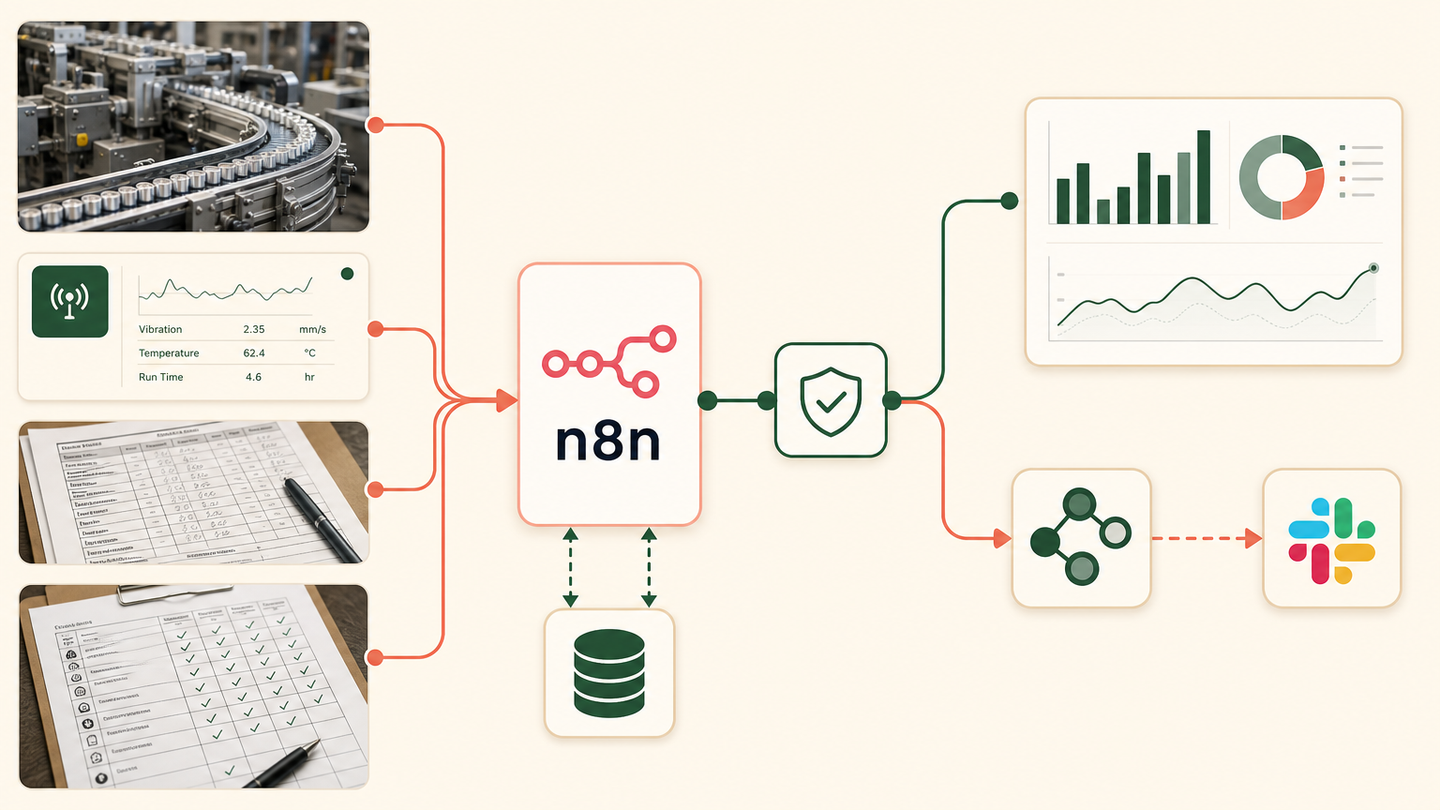
We designed a workflow that combines machine data, shift notes and quality checks into one validated daily record. n8n flags missing or conflicting values, routes exceptions to supervisors and updates the operations dashboard only after review.
Tools and systems used
- Machine data export
- Excel
- n8n
- Postgres
- Power BI
- Slack
The meeting was being used to prepare the meeting
Every shift produced useful information, but not in one form. A machine export showed runtime. A supervisor described the cause. Quality kept another sheet. Operations staff spent the first part of the day deciding which number was current.
The system needed to respect the difference between sensor truth and human explanation while making both available together.
How the workflow runs
- Collect each source
Receive machine exports, spreadsheet rows and scanned shift forms.
- Normalise identifiers
Match line, machine, product, shift and timestamp to a common schema.
- Validate the numbers
Check required readings, units, ranges and cross-source totals.
- Route exceptions
Ask the responsible supervisor to confirm conflicts and downtime reasons.
- Update the record
Write the approved shift summary into Postgres.
- Publish the view
Refresh Power BI and send a compact Slack exception digest.
The system we designed
n8n ingests each source and maps it to line, machine, product and shift. Postgres stores raw inputs and the versioned summary. Validation rules check units, missing periods and impossible values. Exceptions go to the supervisor with both sources attached.
After review, the approved summary refreshes Power BI. Slack receives only the important exceptions and unresolved items, keeping the daily message useful.
How the plant would judge it
Track report completion time, unresolved conflicts, downtime without a reason, manual spreadsheet consolidation and time spent preparing the morning review. Throughput improvement must be measured against plant data after deployment.
Why raw and approved data are separate
The workflow never replaces a machine reading with a human note. Raw events are immutable. The approved operational summary references them and records who resolved each conflict.
Why the opportunity is commercially interesting
Search volume is small, but DataForSEO showed exceptionally high CPC for the phrase. That suggests fewer searches with meaningful commercial intent.
Safeguards and failure handling
- Unit and range checks run before dashboard updates.
- Conflicting sources remain visible and require confirmation.
- Machine data is never overwritten by a written summary.
- Late files can update the shift through a versioned record.
- Safety events always follow the plant’s required escalation process.