
How a Law Firm Made Matter Documents Searchable and Cited
The firm had years of pleadings, research, correspondence and closed-matter documents in iManage. Lawyers knew useful precedents existed, but finding the right passage depended on memory and broad keyword searches.
- Proof basisMarket solution story
- IndustryLegal Services
- Year2026
- ServicesWorkflow Automation, System Integration, AI Automation
This is a market solution story built from Chronexa’s research into real businesses, roles, technology stacks and operating problems. It shows how we would engineer the system. It is not presented as a named client deployment, and no unverified savings or performance result is claimed.
The short answer
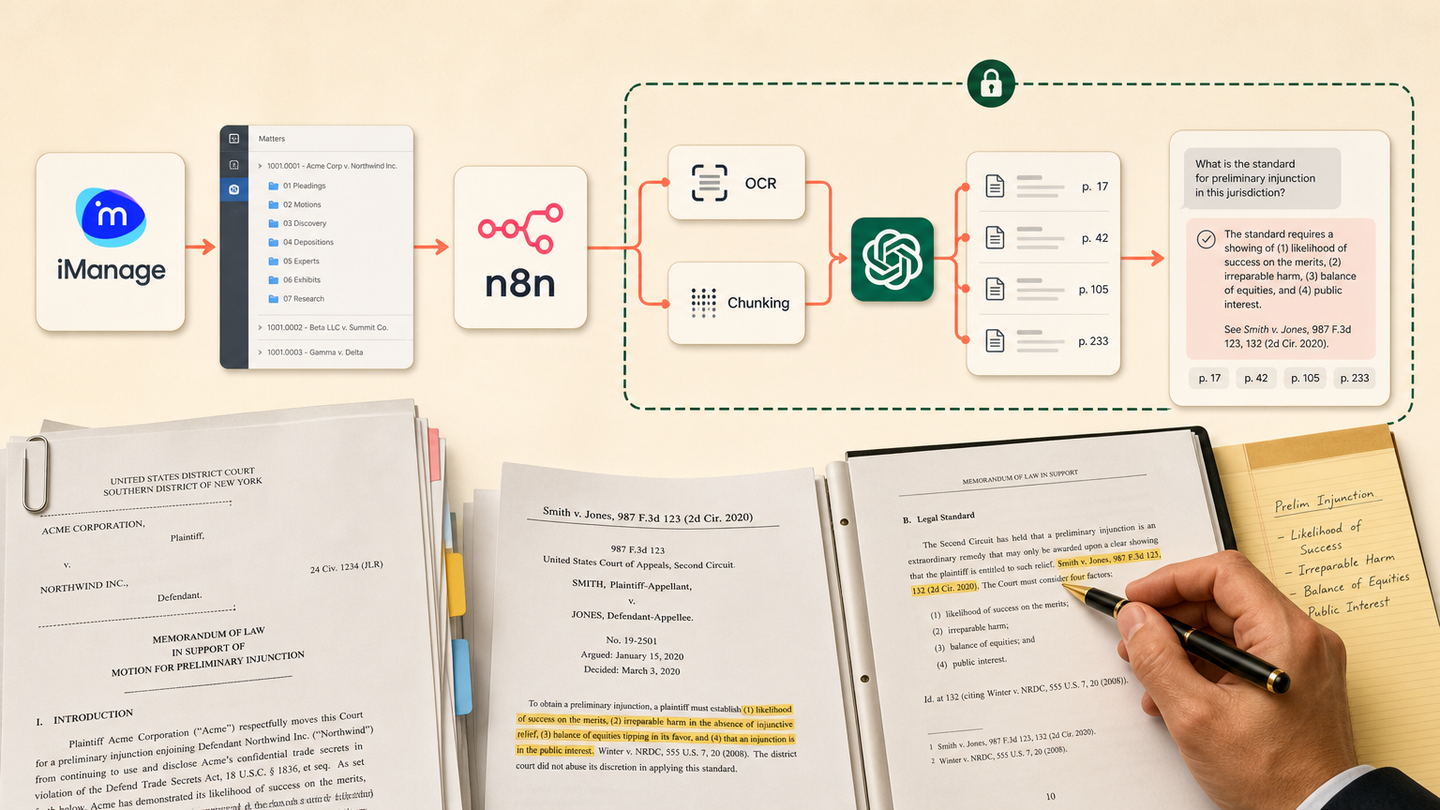
We designed a private retrieval workflow that reads permitted iManage matter documents, extracts text and metadata, creates a searchable index and answers lawyer questions with page-level citations. Permissions are checked before retrieval and the source document remains the authority.
Tools and systems used
- iManage
- n8n
- Azure OCR
- OpenAI embeddings
- Postgres with pgvector
- Private web interface
The knowledge existed but could not travel
Partners remembered which matter contained the useful argument. Newer lawyers searched filenames and asked colleagues. Closed matters were valuable, but opening broad access would create confidentiality problems.
A public AI tool was not acceptable. The system needed private retrieval, matter-aware permissions and citations strong enough for a lawyer to verify quickly.
How the workflow runs
- Select permitted matters
Index only approved document libraries and carry their access controls.
- Extract text and metadata
Read document type, matter, date, author and page-level content.
- Create the index
Split useful passages, create embeddings and store source identifiers.
- Ask the question
Convert a lawyer’s query into retrieval filters and semantic search.
- Generate a cited answer
Use only retrieved passages and attach matter, document and page links.
- Capture feedback
Let lawyers flag weak answers, missing sources and useful precedents.
The system we designed
An ingestion workflow reads only approved iManage libraries. OCR handles scanned files. Metadata and page text are stored with stable document IDs. Embeddings support semantic retrieval in Postgres, while structured filters narrow by matter, document type and date.
At query time, access is checked before search. OpenAI receives only the selected passages and is instructed to answer from them. The interface returns the answer beside direct links to the source pages.
How the firm would judge it
Measure successful searches, time to source verification, citation accuracy, permission failures and reuse of closed-matter work. An answer is useful only when the lawyer can verify it.
The security boundary is part of retrieval
Permissions are not a visual warning after generation. They are applied before passages can enter the model context. Audit logs record user, query, retrieved documents and answer sources.
The commercial position
This page sells a contained knowledge system with a clear risk boundary. It supports high-CPC law-firm automation queries without claiming that a model practices law.
Safeguards and failure handling
- Matter permissions are checked before indexing and again before retrieval.
- No answer is shown without source citations.
- The model cannot write back to the matter file.
- Privilege and ethical-wall rules are enforced as filters.
- Deleted or superseded documents are removed from the index.