
How an Insurance Team Automated First Notice of Loss
Claim notices arrived by form, phone and email. Staff re-entered policy details, downloaded photographs and built a first file before an adjuster could even assess the loss.
- Proof basisMarket solution story
- IndustryInsurance
- Year2026
- ServicesWorkflow Automation, System Integration, AI Automation
This is a market solution story built from Chronexa’s research into real businesses, roles, technology stacks and operating problems. It shows how we would engineer the system. It is not presented as a named client deployment, and no unverified savings or performance result is claimed.
The short answer
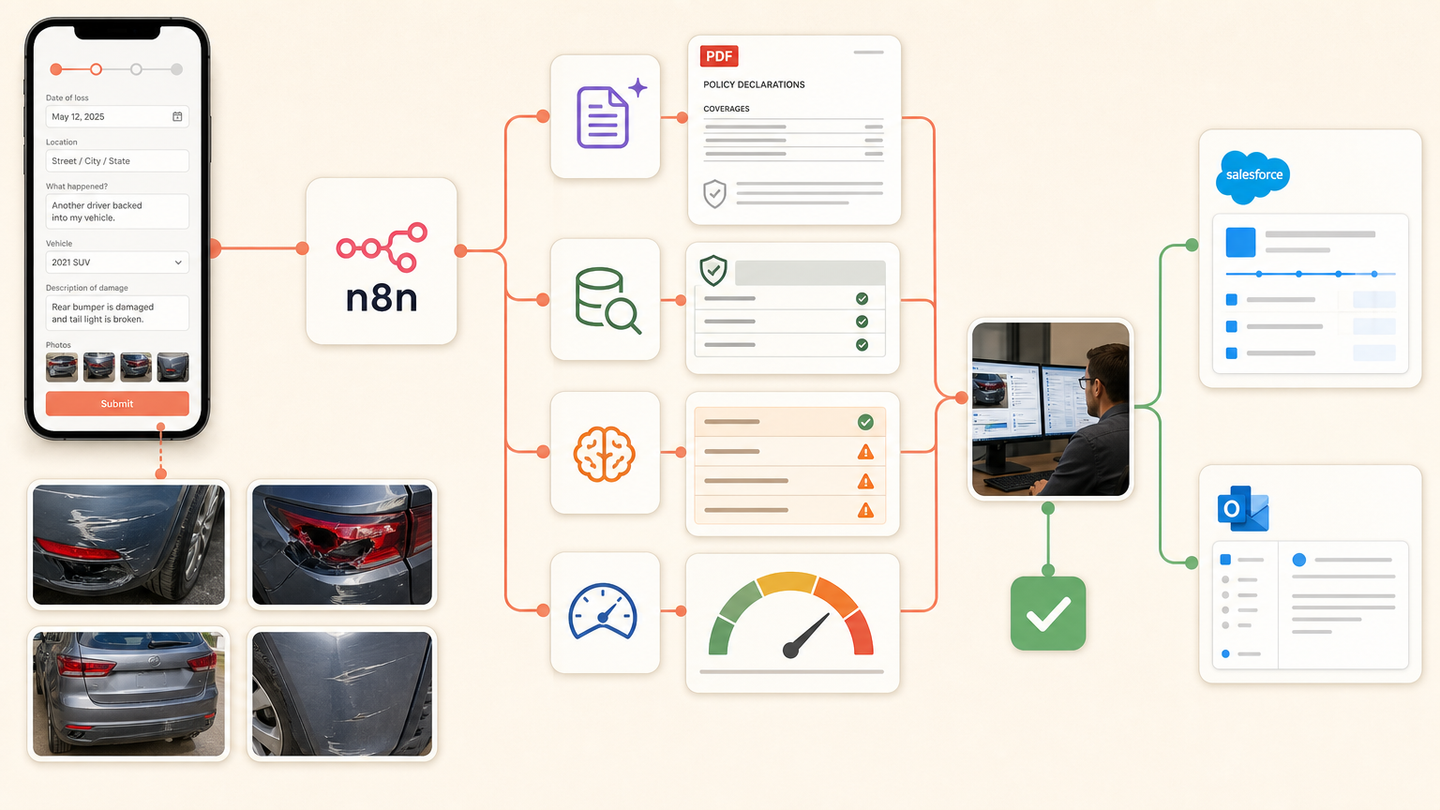
We designed an FNOL workflow that creates a structured claim from forms, calls and documents, verifies the policy, organises photographs, applies severity and fraud rules and prepares an adjuster queue in Salesforce. Coverage and settlement decisions remain human.
Tools and systems used
- Web form and telephony
- n8n
- Azure Document Intelligence
- Salesforce
- SharePoint
- Outlook
The adjuster was waiting for clerical assembly
The information needed to start the claim already existed, but it arrived in several shapes. Operations staff spent the first hours turning messages and attachments into a file. Missing fields were found after the handoff, causing another round of calls.
The system had to improve intake speed without allowing an AI summary to become a coverage decision.
How the workflow runs
- Capture the notice
Accept structured form data, call summaries and emailed evidence.
- Match the policy
Look up the claimant and active policy using approved identifiers.
- Build the file
Extract loss details and organise photographs and documents under one claim ID.
- Apply triage rules
Calculate severity and special-handling flags from visible business rules.
- Send to an adjuster
Create the Salesforce claim and route it to the correct queue.
- Acknowledge receipt
Notify the claimant only after the claim record is confirmed.
The system we designed
A common FNOL schema accepts the permitted fields from each channel. n8n matches the policy, saves the original evidence and uses document extraction for forms and reports. Code applies severity, geography and special-handling rules.
Salesforce receives the structured claim, source links and triage reason. Unmatched policies and uncertain extraction go to an intake queue. Outlook sends receipt confirmation only after Salesforce returns a claim identifier.
How the insurer would judge it
Track time from notice to claim creation, missing-information callbacks, incorrect policy matches, unassigned claims and adjuster corrections. Claim outcome and settlement accuracy remain professional measures outside the automation.
Why the file keeps its sources
A summary is useful for speed, but the original evidence is the record. Each extracted field therefore keeps a document and page reference. The adjuster can move from the Salesforce value to the source.
Why this is commercially strong
DataForSEO showed low difficulty and high CPC for insurance claims automation. The problem also has a clear buyer, a measurable intake stage and a contained first deployment.
Safeguards and failure handling
- No model decides coverage, liability, fraud or settlement.
- Policy matching requires approved identifiers.
- Images and documents retain their original source.
- High-severity and uncertain files bypass straight-through handling.
- Salesforce confirms the claim ID before acknowledgement.