
Two Public Forms, One Clean Airtable Operating Record
For an events business, Chronexa connected event registrations and programme applications to separate controlled webhooks that create structured Airtable records without giving public forms direct database access.
- Proof basisDeployed for a client
- IndustryEvents & Community Operations
- Year2026
- ServicesForm Automation, Airtable Integration, API Design
Verified from two active client workflows. The customer identity, submission volume and downstream commercial results are withheld; the published scope is limited to the deployed intake architecture.
The short answer
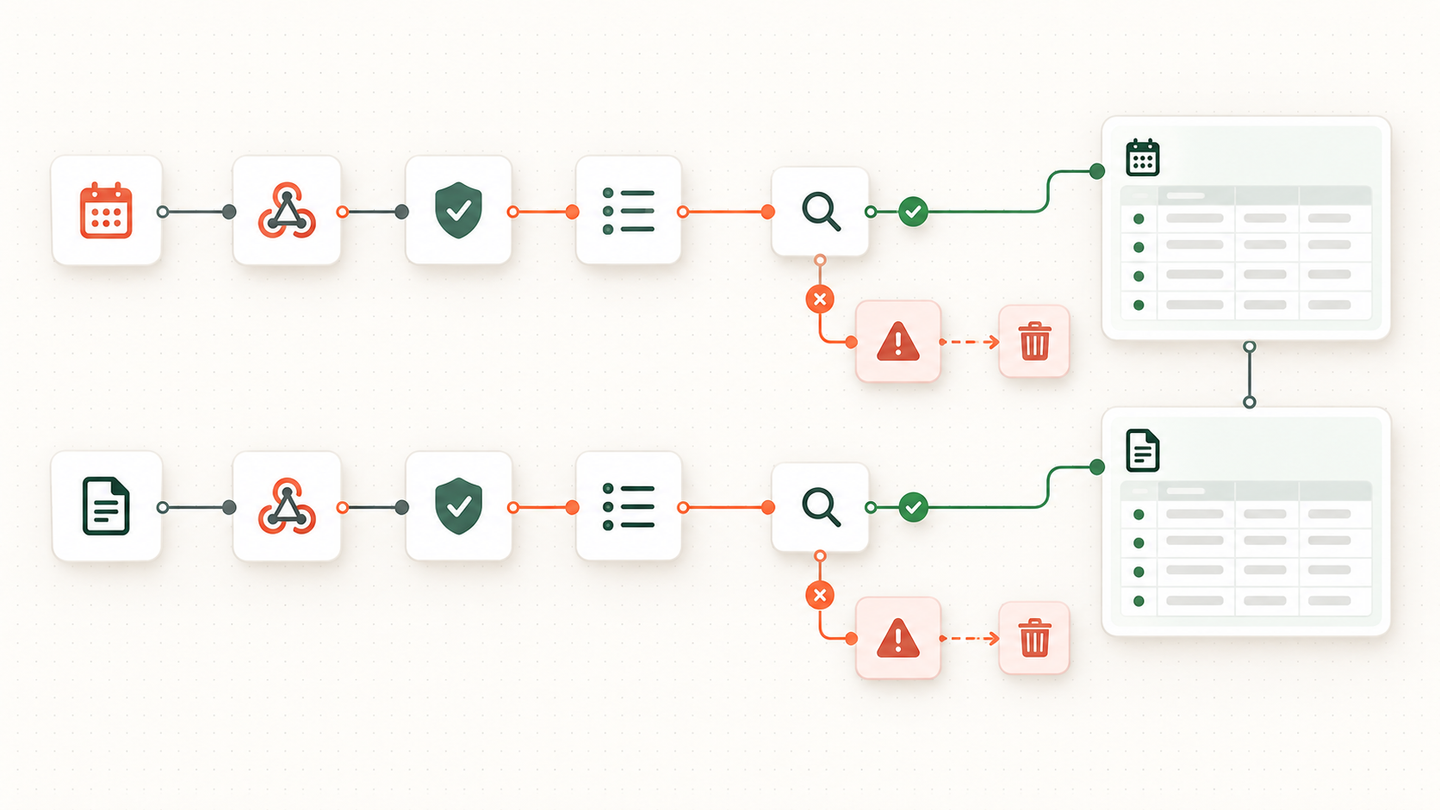
Chronexa built two separate n8n intake routes for an event business: one for registrations and one for applications. Each route validates its own form, maps the fields into a stable Airtable schema and returns a clear success or failure response to the website.
Tools and systems used
- Website forms
- n8n
- Webhooks
- Airtable API
- Server-side validation
Public forms were creating manual transfer work
Registrations and applications arrived through different front-end experiences but both had to become operating records. Manual copying delayed follow-up and introduced inconsistent field names.
Connecting the browser directly to Airtable would have exposed credentials and coupled the public form to the internal schema.
The integration needed a narrow contract
Each form needed a small, explicit payload and one allowed action: create the corresponding record. That boundary reduces both maintenance and security surface.
How the workflow runs
- Submit the correct form
Registration and application forms go to separate endpoints with separate data contracts.
- Validate required fields
The workflow checks the values that must be present before it writes anything.
- Normalise the data
Field names, dates, contact values and select options are mapped to the Airtable schema.
- Create the Airtable record
A successful API response becomes the system confirmation.
- Return a clear response
The website receives a simple success or error result it can show to the visitor.
- Inspect failures
Rejected payloads and Airtable errors remain separate from valid records.
What was deployed
Chronexa built one webhook for event registrations and a second for applications. Each endpoint receives only the fields required for that record type and creates the matching row through the Airtable API.
The front end never receives an Airtable token. Changes to internal tables can be handled in the workflow mapping without rebuilding the public form.
What changed
Submissions now arrive in the operating base in a consistent structure as soon as the user completes the form. The build is intentionally small: fewer moving parts, a clear failure boundary and no AI added where deterministic mapping solves the problem better.
Because registrations and applications keep separate endpoints, the team can change one form, table or validation rule without risking the other. That isolation matters during a live event campaign, when a small schema change should not interrupt every intake path.
The hard part was the field contract
A form integration often fails when a label changes on the website but the database expects the old name. We used explicit mapping between each public field and its Airtable column. Dates and select values are normalised before the create-record call. Required values are checked at the webhook boundary.
Registration and application are related business processes, but they are not the same record. Separate webhook paths keep the logic easy to test. They can still write into connected Airtable tables and share common contact rules where useful.
What improved
The operations team gets clean, searchable rows instead of copying email notifications into Airtable. Visitors receive a response based on the actual database write. The case describes the deployed data path; it does not attach an invented attendance or conversion increase to the automation.
Safeguards and failure handling
- Two endpoints prevent the registration and application schemas from being mixed.
- Server-side checks run even if browser validation is bypassed.
- Airtable’s API response determines success.
- Unexpected fields are not allowed to silently overwrite mapped business data.