
How a Legal Team Turned Contracts Into a Review Queue
Commercial agreements arrived through email and shared folders. Lawyers searched for the same clauses, compared them with a playbook and manually rebuilt issue lists for the business.
- Proof basisMarket solution story
- IndustryLegal Services
- Year2026
- ServicesWorkflow Automation, System Integration, AI Automation
This is a market solution story built from Chronexa’s research into real businesses, roles, technology stacks and operating problems. It shows how we would engineer the system. It is not presented as a named client deployment, and no unverified savings or performance result is claimed.
The short answer
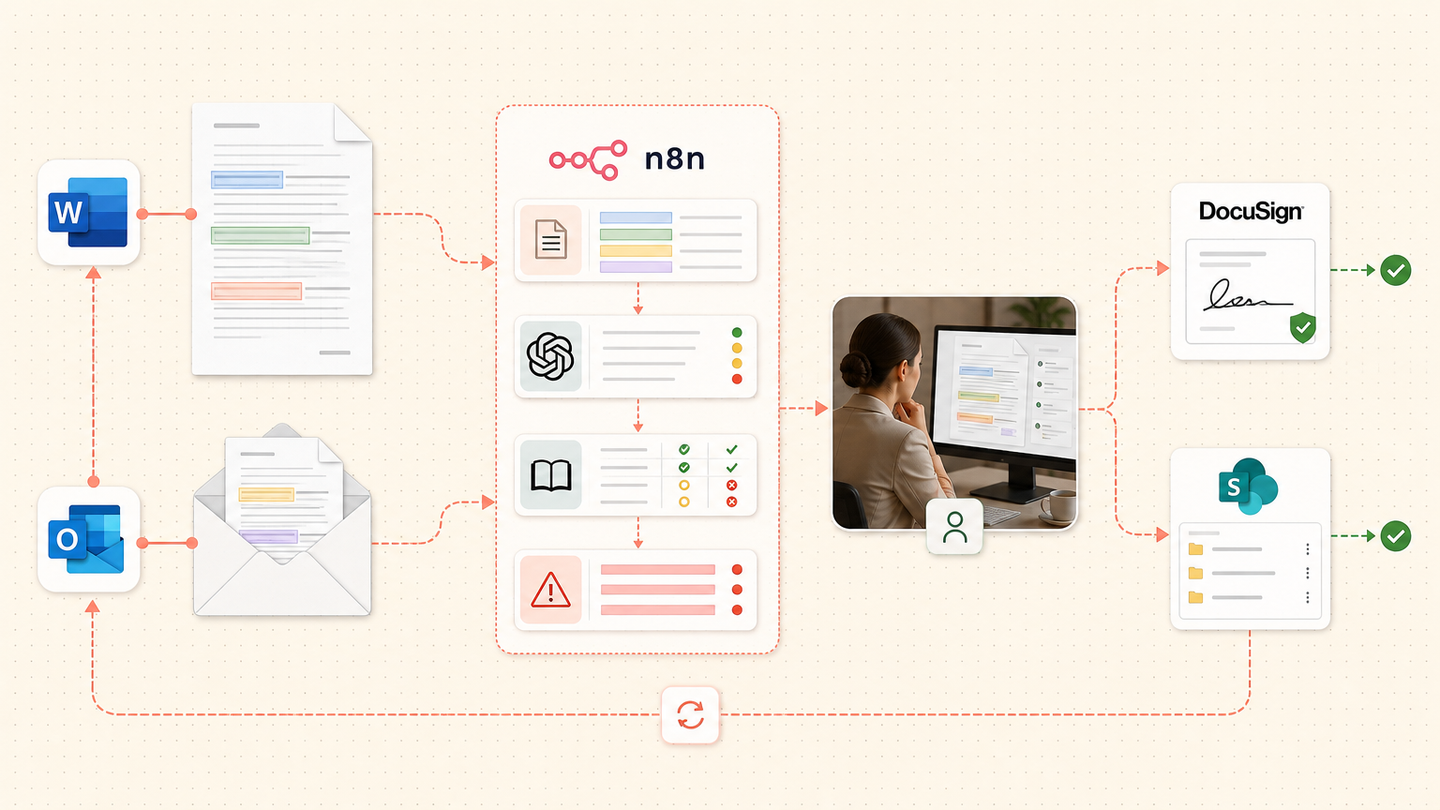
We designed a contract review workflow that extracts clauses, compares them with the legal team’s approved playbook and produces a source-linked issue list. Lawyers decide the risk, wording and negotiation position before DocuSign or SharePoint receives the approved document.
Tools and systems used
- Outlook
- Microsoft Word
- n8n
- OpenAI
- SharePoint
- DocuSign
The repeated work was hiding inside professional work
Lawyers were paid to judge risk, but much of the first pass was mechanical: locate clauses, compare wording and copy deviations into an email. The same fallback position was rewritten across matters. Under deadline, issue lists were difficult for the business to compare.
The opportunity was not to replace legal judgment. It was to make the evidence and playbook comparison ready before that judgment began.
How the workflow runs
- Open the matter
Create a review record from email or SharePoint and retain the original file.
- Extract the structure
Identify parties, dates, clauses, schedules and defined terms with page references.
- Compare the playbook
Match each clause against approved positions and fallback wording.
- Build the issue list
Show deviations, missing language and the exact source passage.
- Complete legal review
A lawyer accepts, edits or rejects each proposed issue.
- Return the document
Store the approved version and send it to the authorised signature process.
The system we designed
Outlook or SharePoint creates a matter record. n8n converts the document into a consistent text and page structure. OpenAI returns clauses through a fixed schema. A rules layer maps each clause to the current playbook position and builds an issue list with links.
The lawyer works through exceptions, edits proposed language and records the decision. The final state controls document storage and DocuSign handoff. Every output carries the contract, playbook and prompt version used.
How the legal team would judge it
Measure first-pass time, clauses requiring correction, issue-list consistency, turnaround and percentage of reviews using the current playbook. Legal quality cannot be reduced to the number of model flags.
Why citations matter more than fluent summaries
A reviewer must see exactly where the issue came from. The workflow stores character and page references, and it suppresses any issue that cannot point to contract language.
Why this page can attract buyers
Contract review automation showed 110 monthly US searches, $61.48 CPC and difficulty 9. It is narrow enough to demonstrate architecture and commercial enough to attract active buyers.
Safeguards and failure handling
- Every issue links to the contract page and playbook rule.
- The model cannot approve wording or provide unsupervised legal advice.
- Prompt and playbook versions are stored with the review.
- Conflicting definitions and missing schedules trigger manual review.
- Signature begins only after an authorised approval state.