
How a B2B Team Stopped Leads Falling Between Its Systems
Website forms, calls, event lists and direct emails were creating separate lead records. Sales managers could not see which enquiry had been answered, who owned it or why a promising record was ignored.
- Proof basisMarket solution story
- IndustryB2B Sales Operations
- Year2026
- ServicesWorkflow Automation, System Integration, AI Automation
This is a market solution story built from Chronexa’s research into real businesses, roles, technology stacks and operating problems. It shows how we would engineer the system. It is not presented as a named client deployment, and no unverified savings or performance result is claimed.
The short answer
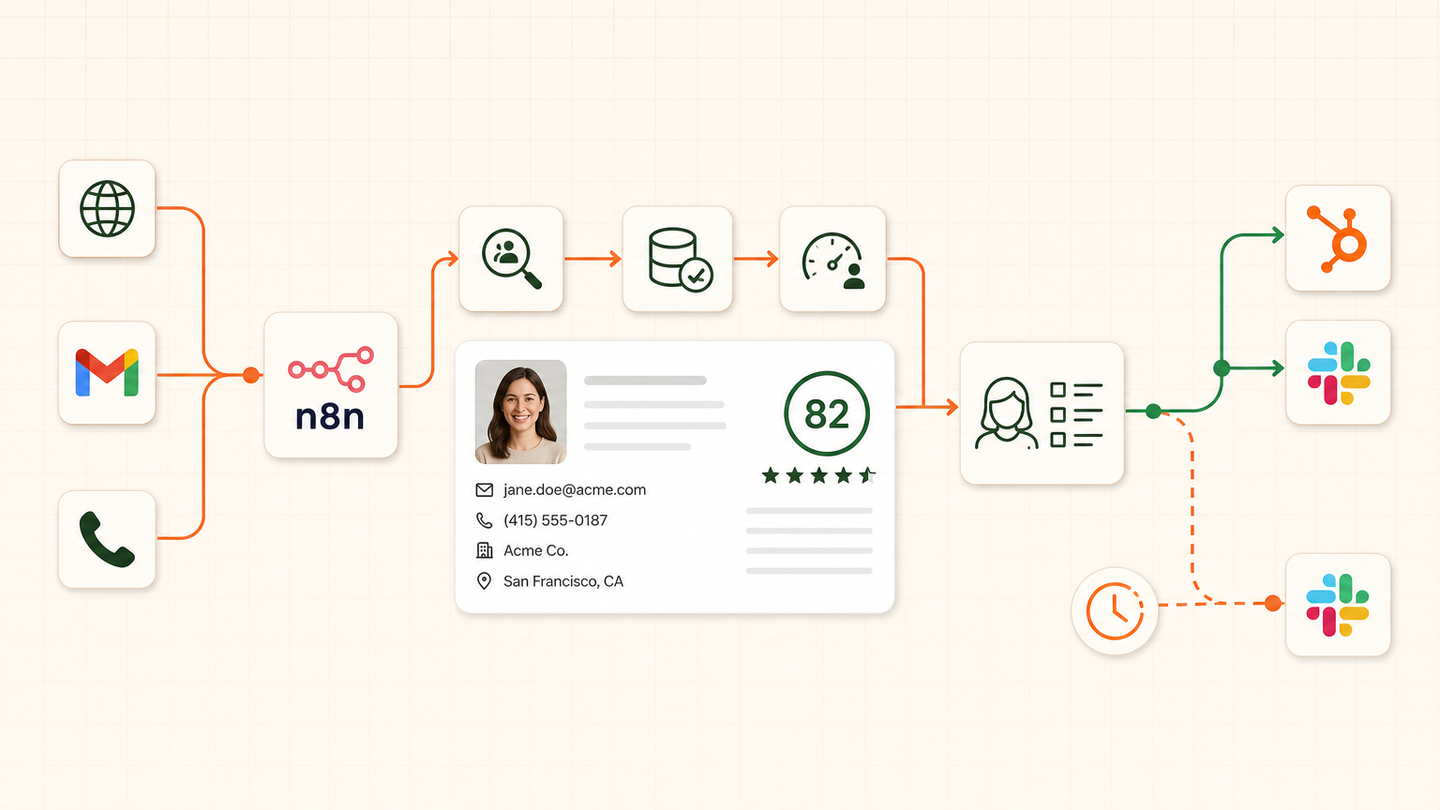
We designed one n8n intake layer that normalises leads from every channel, checks duplicates, enriches permitted fields, scores with visible rules and assigns the record in HubSpot. Slack alerts and an SLA watchdog make unanswered high-intent leads visible.
Tools and systems used
- Website forms
- Gmail
- Twilio
- n8n
- HubSpot
- OpenAI
- Slack
- Postgres
The company had leads but no shared clock
Each channel worked on its own. Marketing counted form fills. Sales worked from HubSpot. Calls lived in another system. A lead could receive two replies or none. Managers discovered the gap only when a prospect complained.
The business problem was not another CRM feature. It was the missing coordination between systems and the absence of one ownership event.
How the workflow runs
- Receive every channel
Convert form, email, call and import events into one lead contract.
- Find existing records
Match email, phone and domain before creating a new CRM contact.
- Enrich carefully
Add allowed company and role data with source and timestamp.
- Classify and score
Use AI for message intent and fixed code for the commercial score.
- Assign ownership
Apply territory, service and capacity rules inside HubSpot.
- Watch the SLA
Alert Slack and escalate if a high-priority lead remains untouched.
The system we designed
Every source sends a small event into n8n. A normalisation step produces the same fields regardless of channel. Postgres controls idempotency. HubSpot lookup decides whether to create, update or attach an activity. OpenAI can classify free-text intent, while code calculates the score.
Assignment rules consider service, territory and current ownership. The workflow writes the reason beside the owner. A watchdog checks high-priority records and sends Slack alerts when the agreed response time is missed.
How the team would judge it
Track duplicate creation, unowned leads, median first-response time, SLA misses, opt-out failures and lead-to-meeting rate by source. Revenue attribution should use CRM outcomes, not workflow execution counts.
Why one intake contract matters
Channel-specific fields are mapped at the edge. Everything after that uses a stable schema. This makes new sources cheaper to add and prevents business rules from being copied into several workflows.
What creates trust
The CRM stores the score components and routing reason. Sales can disagree with a decision and improve a rule rather than treating the system as a black box.
Safeguards and failure handling
- Postgres idempotency protects against webhook replay.
- The model cannot choose the final score or salesperson.
- Enrichment sources and dates are stored.
- Opt-out and consent fields override follow-up rules.
- SLA alerts do not send customer messages.