
How an Operations Team Replaced Invoice Data Entry With Exceptions
The operations team processed invoices for several entities and systems. The data-entry pattern was similar, but templates, currencies, tax fields and approval paths varied enough to break a rigid OCR tool.
- Proof basisMarket solution story
- IndustryBusiness Operations
- Year2026
- ServicesWorkflow Automation, System Integration, AI Automation
This is a market solution story built from Chronexa’s research into real businesses, roles, technology stacks and operating problems. It shows how we would engineer the system. It is not presented as a named client deployment, and no unverified savings or performance result is claimed.
The short answer
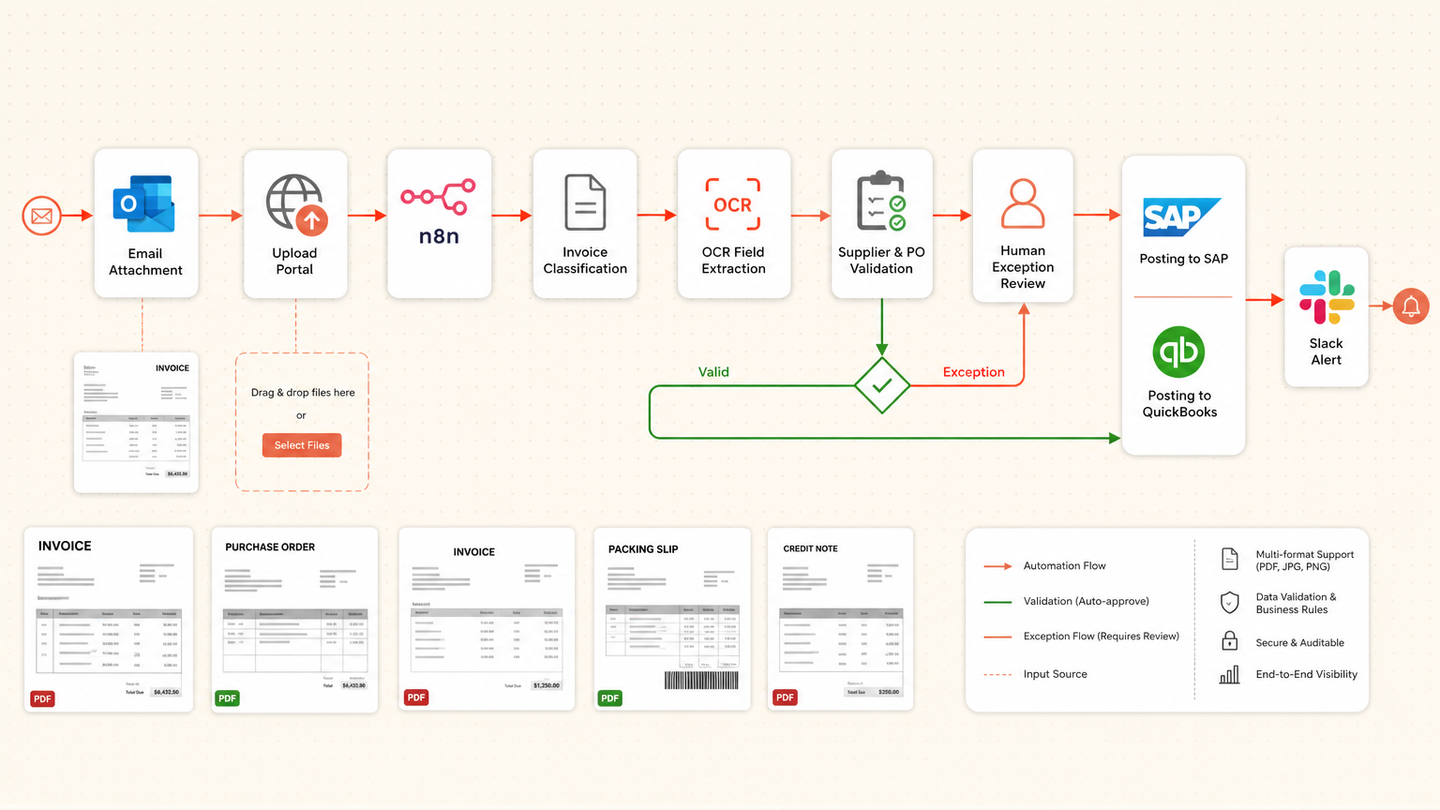
We designed an intelligent document processing workflow that learns document layouts without assuming one template, validates extracted invoice data in code and sends only uncertain fields to an exception queue. Approved records can feed an ERP, spreadsheet or accounting platform.
Tools and systems used
- Email and file upload
- n8n
- Azure Document Intelligence
- OpenAI
- Postgres
- ERP or accounting API
- Slack
The first OCR attempt solved the demo, not the operation
A sample invoice looked easy. Production documents did not. Vendors moved fields, scanned pages badly and mixed statements with credit notes. The old tool either rejected too much or passed wrong data without showing why.
The useful system had to treat uncertainty as normal work rather than an edge case.
How the workflow runs
- Ingest the file
Save the original document, source channel and entity.
- Classify the document
Identify invoice, credit note, statement or unsupported file.
- Extract the schema
Read header, line, tax and payment fields with confidence and location.
- Validate business rules
Check totals, currency, entity, vendor and duplicate conditions.
- Resolve exceptions
Show only the uncertain fields and source image to an operator.
- Export the record
Write the approved data to the target system and keep the returned ID.
The system we designed
The pipeline classifies the file before extraction and selects the right schema. Document Intelligence returns values, confidence and coordinates. OpenAI is used only where semantic interpretation is needed. Code validates totals, duplicates, entities and allowed currencies.
The exception interface shows the original crop beside the proposed value. Once approved, n8n writes to the target API and records the returned identifier.
How the team would judge it
Measure straight-through rate, fields corrected per document, handling time, duplicate blocks and exports without a source reference. Accuracy should be agreed per field on the company’s own document set.
Why this can start small
One document type and one target system are enough for a first production release. The exception data then shows which vendor patterns deserve the next improvement.
Why the search opportunity is strong
Invoice processing automation showed 260 monthly US searches, $177.80 CPC and difficulty 24. Broader data-entry and document-processing terms add discoverability without changing the specific buyer problem.
Safeguards and failure handling
- Unsupported document types stop early.
- Arithmetic and duplicate checks are deterministic.
- Low-confidence values require review.
- Every exported value keeps the source location.
- Target-system confirmation controls completion.