
From Client Intake Call to Engagement Letter in 15 Minutes
A US CPA firm wanted its existing Firm360 and UltraTax workflow to move faster without adding another portal. We connected intake, document chasing, OCR, review, scoping, e-signature, invoicing and onboarding into one controlled flow.
- Proof basisDeployed for a client
- IndustryCPA & Tax Services
- Year2026
- ServicesDocument Intelligence, Workflow Automation, System Integration
This is an anonymised client deployment described by Chronexa in a private 2026 industry call. The workflow and 10–15 minute engagement-letter timing are first-party details; no client name or unsupported ROI estimate is published.
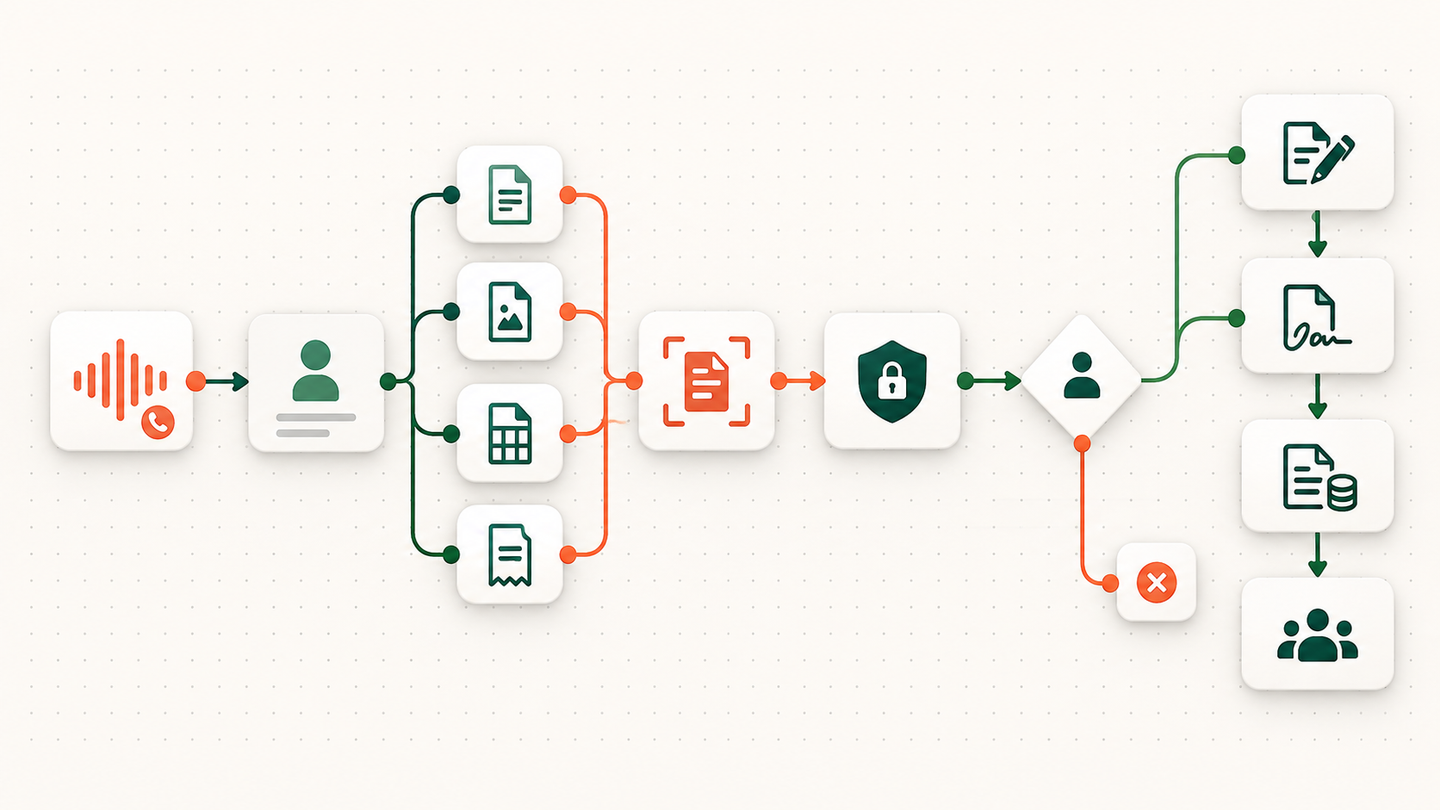
The short answer
Chronexa connected a CPA firm’s existing Firm360 and UltraTax CS process so an intake call could become a reviewed engagement-letter draft in about 10–15 minutes. The system checks missing documents, extracts tax data, protects client identity and keeps scope, pricing and tax decisions with the firm.
Tools and systems used
- Firm360
- UltraTax CS
- Secure document vault
- OCR / document extraction
- Large language model
- E-signature provider
- Invoicing system
The client did not want another tool
The firm already ran its work through Firm360 and UltraTax CS. The problem was the manual space between those systems: notes from the intake call, emails requesting missing W-2s and K-1s, uploaded files, scope preparation, the engagement letter, invoice and onboarding. A new standalone application would have created another login and another source of truth.
The design brief was therefore narrow and practical: make the existing stack behave like one system, preserve the firm’s review points, and keep identifiable tax data away from general-purpose AI steps.
Where the work stalled
After an intake call, a team member reconstructed the client profile, identified missing documents, wrote the follow-up, reviewed uploads and prepared a rough scope. Each handoff could wait in an inbox. The advisor could not move to the commercial conversation until the administrative work was complete.
How the workflow runs
- Capture the intake
The intake call is transcribed and turned into a structured client profile instead of a loose set of notes.
- Build the document checklist
The profile is matched against the documents expected for that client and return type.
- Request what is missing
The workflow drafts a precise follow-up for missing W-2s, K-1s and other required files.
- Extract and cross-check
Files in the secure vault pass through OCR. Structured values are compared and uncertain or conflicting items are flagged.
- Prepare the commercial package
After human review, the workflow drafts scope, pricing, the engagement letter and invoice.
- Start onboarding
Signature and payment events move the accepted client into the firm onboarding process.
What Chronexa built
The intake call is transcribed and converted into a structured client profile. The workflow compares that profile with the expected document checklist and drafts precise requests for anything missing. Uploaded documents enter a secure vault and pass through OCR before any AI review.
The privacy boundary is deliberate: OCR extracts structured values first, and the reasoning step receives de-identified fields rather than a client’s identity. The system cross-checks values, flags conflicts and prepares possible service needs for human review. It then drafts a scope and price range, creates the engagement letter, sends it for e-signature, raises the invoice and starts onboarding.
What changed
The firm can produce the engagement-letter draft roughly 10–15 minutes after the intake call rather than rebuilding the file by hand. The advisor still approves scope, price and tax conclusions. Automation removes the waiting and re-keying around those decisions; it does not make them.
How the systems were connected
Firm360 remains the place where the firm manages the relationship. UltraTax CS remains the tax system. The automation layer moves structured data between them and the surrounding document, signature and billing services through APIs, webhooks and controlled file handoffs. That matters because replacing the practice-management or tax platform would have made the project slower and riskier.
The document stage is split in two. OCR reads the file first. A reasoning step then works with selected, de-identified fields. It does not receive the client’s full folder and it does not write a tax position straight into the return. The output is a checklist, a set of possible conflicts and a draft for review.
What the 10–15 minute result means
The measured time is from the end of the intake call to a drafted engagement letter in the deployed workflow. It is not a promise that every tax return is prepared in 15 minutes. Difficult files, poor scans and unusual tax positions still need professional review. The gain comes from removing re-keying, inbox waiting and repeated document chasing around that professional work.
Safeguards and failure handling
- Client identity is separated from the data sent to general-purpose AI steps.
- Low-confidence OCR and conflicting values are sent to a person instead of being silently accepted.
- A partner or authorised team member approves tax conclusions, scope and price.
- The firm’s existing systems remain the source of record; the automation coordinates them.