Your Lead Scoring Model Is Broken. Your AEs Already Know It.
Ask any AE at a company using HubSpot or Salesforce's native lead scoring whether they trust the MQL queue. Nine times out of ten, the honest answer is no. They've seen too many "hot" leads — 85-point scores, Marketing Qualified, priority flag — that turn out to be a competitor researching the product, a student building a project, or a contact who opened three emails because their preview pane auto-fired the open pixel.
They've learned to ignore the score and work the accounts they know from experience. Which means the scoring model — however many hours went into building it — is functionally decorative.
This isn't a calibration problem. It's an architectural one. Default CRM lead scoring is built inside a system optimized for record management, not signal processing. You're asking a database to do the work of an inference engine, and it can't. The result is a point system that rewards activity proxies instead of measuring actual buying intent — and a sales team that has quietly stopped trusting the output.
The fix isn't tweaking the point values. It's moving the scoring logic entirely outside the CRM into an orchestration layer that can handle multi-variable inputs, external signal enrichment, and weighted probabilistic models. That layer is n8n.
What Native CRM Scoring Actually Measures (And Why It's Wrong)
HubSpot's default scoring model and Salesforce Einstein's standard setup share the same fundamental flaw: they treat behavioral activity as a proxy for intent without controlling for signal quality.
Here's what a typical native model rewards:
+10 — Email opened
+15 — Clicked a link in email
+20 — Visited website
+25 — Filled out a form
+30 — Watched a demo video
-10 — Unsubscribed
Every one of those signals can fire for reasons that have nothing to do with purchase intent. Email opens are unreliable since Apple Mail Privacy Protection pre-loads pixels on half your list. Link clicks include bots, security scanners, and link preview services. Form fills happen from job candidates, partners, and journalists as often as from buyers. The model doesn't know the difference and can't — because it has no access to the contextual data that would let it distinguish a $500K ARR target account's VP of Ops clicking your pricing page from a freelancer clicking it for competitive research.
The deeper problem: native scoring is additive and static. Points accumulate. They rarely decay meaningfully. A contact who was hot six months ago and has gone completely cold still has a high score because the model doesn't model intent volatility — it models history. And it has zero ability to incorporate external signals that aren't already in the CRM record.
Why Scoring Belongs in the Orchestration Layer
The argument for moving scoring to n8n isn't about n8n specifically. It's about what an orchestration layer can do that a CRM cannot:
Pull from multiple external APIs in real time — 6sense intent data, G2 buyer activity, Clearbit firmographics, product usage telemetry from your data warehouse, LinkedIn job change signals from tools like Clay
Run weighted scoring algorithms in code, not in a point-click interface with a hard ceiling on logic complexity
Recalculate scores dynamically — trigger a re-score when a new intent signal fires, not on a nightly batch job
Write enriched scores back to the CRM as a structured field, not as the CRM's own internal score, so the model is portable and auditable
Version control the scoring logic — you can track every change to the algorithm in Git, which you cannot do with a HubSpot workflow
The CRM becomes the record system. n8n becomes the intelligence layer. Those are different jobs, and conflating them is why most scoring implementations fail.
The Multi-Variable Scoring Model: Architecture
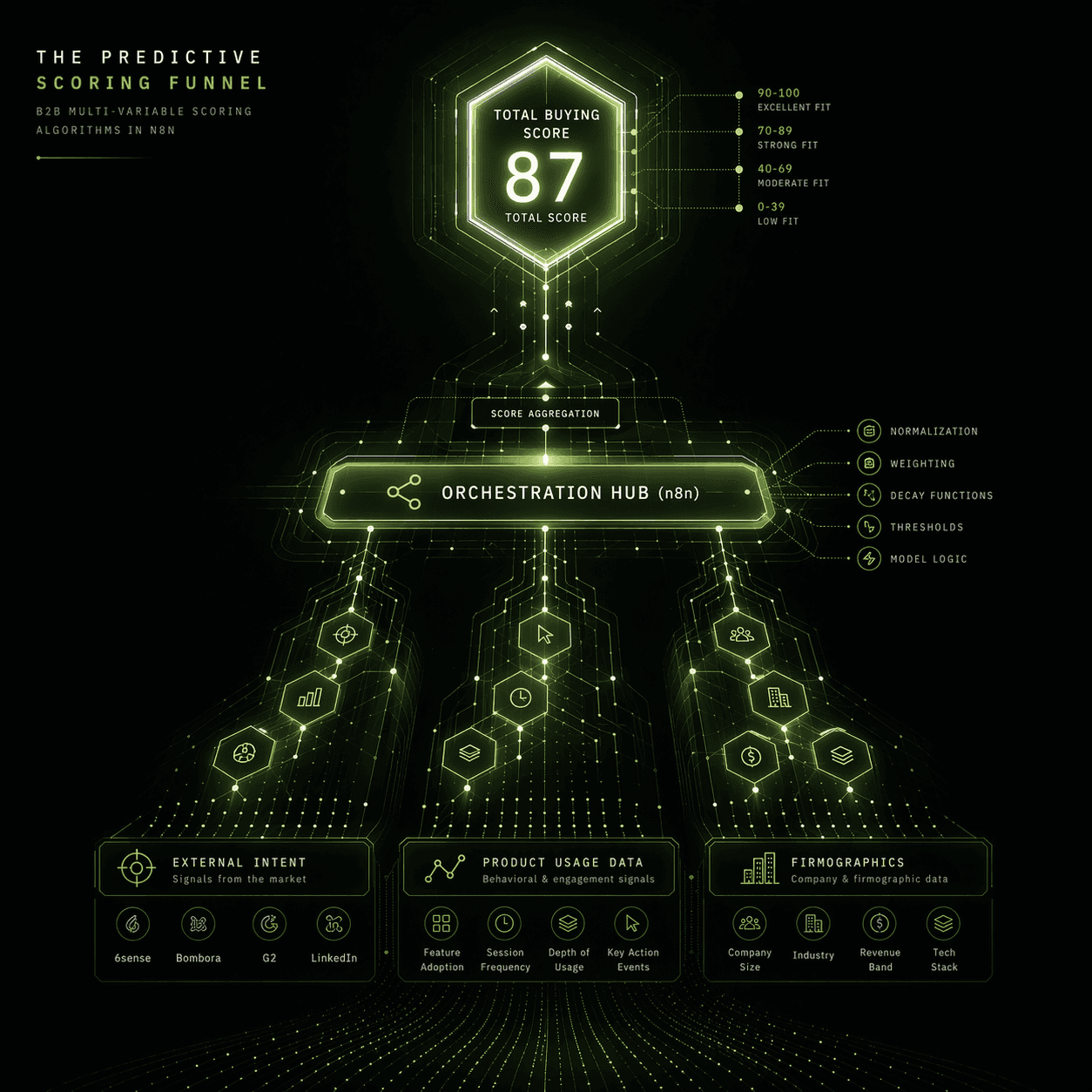
This model operates on four signal categories, each weighted differently based on what actually predicts conversion in a B2B pipeline.
Signal Category 1: Firmographic Fit (Max 30 Points)
This is the baseline. Before any behavioral or intent signal matters, the account needs to fit your ICP. Score it first and use it as a gate — if firmographic fit is below a threshold, don't bother scoring the rest.
Why tech stack matters: A company running Salesforce + Apollo + 6sense is already invested in outbound infrastructure. They're not evaluating whether to build a RevOps function — they're evaluating how to make it better. That's a fundamentally different sales conversation than a company with zero tooling.
Signal Category 2: Product and Engagement Signals (Max 25 Points)
This is where behavioral data belongs — but contextualized and decayed properly.
The recency decay function is the key detail most scoring models skip entirely. A contact who visited your pricing page yesterday is fundamentally different from one who visited three weeks ago. The decay factor weights recent signals heavier and lets old signals fade rather than accumulate indefinitely. This alone fixes the stale pipeline problem.
Signal Category 3: External Intent Signals (Max 35 Points)
This is the category native CRM scoring cannot touch — and it's the highest-weighted category in this model for a reason. External intent signals represent a prospect's behavior outside your ecosystem, which is far more predictive than their behavior inside it because it's unfiltered by your marketing funnel.
The G2 comparison signal deserves emphasis: a contact who is actively comparing your product against competitors on G2 has self-identified as an in-market buyer. That's not an email open. That's someone building a business case. Weight it like it matters.
Signal Category 4: Negative Signals and Disqualifiers (Penalty Up to -40 Points)
Most models only add. This one also subtracts — aggressively.
The bot detection penalty is one most teams never implement. If a contact has opened every single email you've ever sent but never replied once, that's not a hot lead — that's a mail security scanner doing link previews. Treating it as engagement is how you end up routing phantom contacts to your AE team.
Wiring It Together in n8n
The complete scoring workflow executes in this sequence:
Trigger: Webhook from CRM on contact create/update, OR a scheduled re-score every 24 hours for active pipeline contacts
Enrichment: Parallel HTTP Request nodes to Clearbit (firmographics), 6sense API (intent stage), G2 (buyer activity), and your internal product database (usage events)
Scoring Function node: Runs all four signal categories, returns a composite score (0–100) and a breakdown object with per-category subscores
Classification IF node: Score ≥ 75 → "Hot," 50–74 → "Warm," 25–49 → "Nurture," < 25 → "Suppress"
CRM Write-back: Updates three Salesforce fields:
AI_Lead_Score__c(integer),Score_Tier__c(picklist),Score_Breakdown__c(JSON string for transparency)Routing: Hot leads trigger the Slack SLA notification workflow; Warm leads enter a specific Apollo nurture sequence; Suppress leads are tagged and excluded from sends
The score breakdown field is non-negotiable. When an AE looks at an 82-point lead and sees {"firmographic": 28, "engagement": 18, "intent": 35, "penalties": -1} — they understand why it's hot. A score without a rationale is still a black box, and AEs will ignore black boxes.
The Trust Problem Is a Transparency Problem
The reason AEs ignore CRM scores isn't irrationality. It's pattern recognition from repeated experience with opaque models that fire false signals. The fix is not a better algorithm alone — it's a better algorithm with a visible, auditable rationale.
When a rep can see that a lead scored 81 because the account is in 6sense's Decision stage, the VP of Ops just joined from a company that used your competitor, and they hit the pricing page twice this week — they don't need to be convinced to prioritize that call. The data speaks for itself.
That's what good scoring looks like: not a number, but a case.
Let's Build a Model Your AEs Will Actually Use
If your current lead scoring is generating MQLs that the sales team quietly ignores, the scoring architecture is the problem — not the sales team's work ethic.
At Chronexa, we build custom predictive lead scoring systems in n8n that pull from your actual signal sources, run multi-variable weighted models, and write transparent score breakdowns back to your CRM. The engagement starts with a model design session: we map your existing signal sources, define your ICP variables, and architect the exact scoring logic before a single node is built.
If your AEs aren't trusting the queue, that session will show you precisely why — and what the model needs to look like to change that.
Book the scoring model design session here
— come with your current scoring setup and we'll tell you exactly what it's missing.
Written by Ankit Dhiman — Founder & CEO at Chronexa. Ankit leads a lean team of n8n automation engineers building production-grade AI workflows for mid-market B2B companies across fintech, legal, SaaS, and operations. Book a free 30-minute strategy call to see what's possible for your team.
Related Articles
Ready to transform your operations?
Chronexa builds autonomous agentic systems and AI workflows that drive real ROI. Explore our AI Document Processing, Sales & Revenue Operations, or Custom AI Workflows services today.
About author
Ankit is the brains behind bold business roadmaps. He loves turning “half-baked” ideas into fully baked success stories (preferably with extra sprinkles). When he’s not sketching growth plans, you’ll find him trying out quirky coffee shops or quoting lines from 90s sitcoms.

Ankit Dhiman
Head of Strategy
Subscribe to our newsletter
Sign up to get the most recent blog articles in your email every week.