The Deal Closed at 4:47 PM. At 9 AM the Next Day, Nobody Had Done Anything.
The AE updated the Salesforce stage to Closed-Won, sent a celebratory Slack message, and logged off. The new customer sent a "looking forward to getting started" email that sat in a shared inbox overnight. CS found out about the new account the next morning when they happened to check the CRM. Finance got notified via a forwarded email chain. The provisioning ticket went into a queue. The welcome email was written manually and sent three days later.
By the time onboarding actually started, the customer had already begun to wonder if they'd made the right call.
This is not an edge case. It's the default state at most mid-market SaaS companies — a revenue motion that treats the close as the finish line when it's actually the starting line of the most trust-sensitive phase of the customer relationship. The first 72 hours post-close set the tone for the entire customer lifecycle. A chaotic handoff doesn't just create friction — it erodes the confidence the AE just spent three months building.
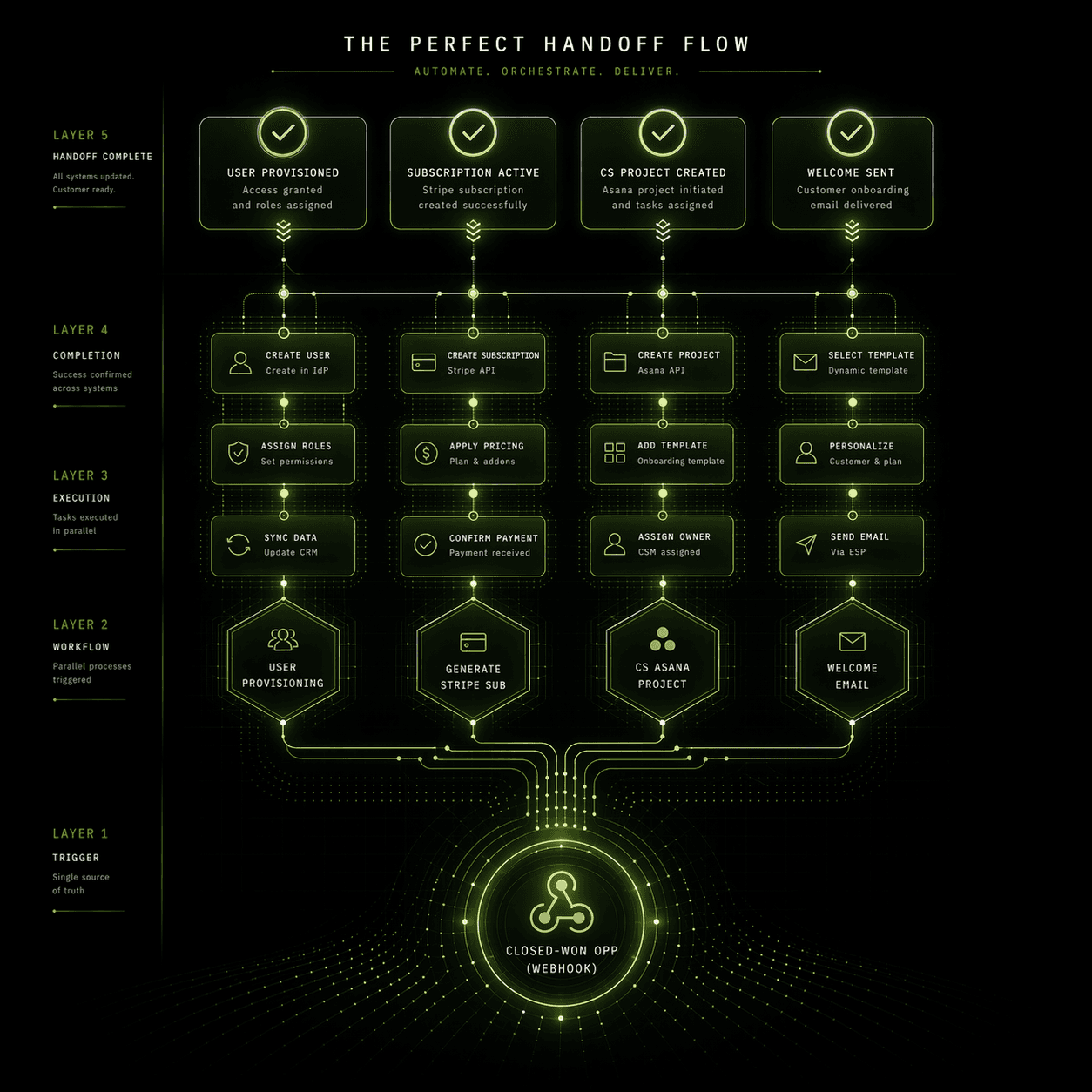
The operational fix is a fully automated "Perfect Handoff" workflow. When an opportunity hits Closed-Won in Salesforce, a webhook fires n8n, and within 60 seconds: the user is provisioned in your product, a Stripe subscription is created, a CS onboarding project is spun up in Asana, and a personalized welcome email lands in the customer's inbox. No manual steps. No queue. No human in the critical path.
Why Manual Handoffs Fail Systematically
Before the architecture, the failure modes are worth naming precisely — because the fix needs to address each one.
AE note capture is inconsistent: The deal notes live in Salesforce Activities, email threads, a Notion doc someone made during discovery, and the AE's memory. CS gets whatever the AE remembered to log on a Friday afternoon.
Provisioning is a separate request: Most product provisioning requires a ticket, an admin action, or an API call that nobody automated. It sits in a queue that moves at human speed.
Billing is initiated manually: Someone in Finance or RevOps creates the Stripe subscription, sets the billing date, and configures the plan — usually after being reminded. Stripe subscriptions created a week late mean a week of revenue that's harder to reconcile.
CS onboarding tasks are created manually: A CS manager sees the new account, creates an Asana project from a template (if the template exists and is up to date), and assigns tasks — usually days after close.
The welcome experience is ad hoc: Every AE has a slightly different version of the handoff email. Some send it same-day. Some don't send one at all and leave it to CS.
Every one of these is a process that should run automatically, in parallel, the moment the deal is won.
The Perfect Handoff: Workflow Architecture
Trigger: Salesforce Closed-Won Webhook
Configure a Salesforce Flow (or Process Builder if you're on an older org) to fire an outbound webhook payload the instant StageName transitions to Closed Won on an Opportunity record.
The payload should include everything the downstream workflow needs without additional API calls where possible:
This fires to your n8n Webhook node (/webhooks/closed-won-handoff). From this point, every downstream action runs in parallel via n8n's parallel branch execution — not sequentially. The goal is for all four provisioning actions to complete within 60 seconds of the webhook firing.
Branch 1: Product Provisioning via API
The first branch hits your product's user provisioning API immediately. The exact endpoint depends on your architecture, but the pattern is consistent:
The response returns a workspace_id and a setup_url — a unique onboarding link for the customer. Store both in n8n's workflow context. The setup_url feeds into the welcome email in Branch 4.
Error handling: If provisioning fails (API timeout, plan type mismatch, duplicate account), write the error to a PostgreSQL staging table and fire a Slack alert to RevOps immediately. Do not let provisioning failures silently drop — a customer who closes and can't access the product within 24 hours is a churn risk you just created.
Branch 2: Stripe Subscription Creation
The second branch creates the billing subscription programmatically, eliminating the Finance queue entirely.
Two configuration details that matter:
billing_cycle_anchor: Set to the first of the following month, not the close date. Billing a customer for a partial month before they've even onboarded generates support tickets and bad will. This is a one-line fix that CS teams will thank you for.Metadata fields: Always write the Salesforce Opportunity ID and AE name into Stripe metadata. When Finance reconciles revenue six months from now, that metadata is what connects a Stripe subscription to a CRM deal without a manual lookup.
After the subscription is created, write the stripe_subscription_id back to the Salesforce Opportunity record via a Salesforce node update. This is the foundation of your billing-CRM sync loop — discussed further below.
Branch 3: CS Onboarding Project in Asana
The third branch creates a fully structured onboarding project in Asana — not a blank project, a template instantiation with tasks pre-populated and due dates pre-calculated from today's date.
Use Asana's Project Instantiation from Template API (POST /projects/instantiate_template):
The deal notes URL field in the Asana project is the direct fix for the "AE didn't pass notes" problem. CS doesn't need to ask Sarah — the Salesforce note URL is embedded in the project on day one. No Slack message required. No knowledge lost in transition.
Assign the project to the appropriate CS rep using a round-robin logic Function node against your CS roster table — the same pattern used in the lead routing workflow. Junior CS handles Growth plan accounts; Senior CS handles Enterprise. The routing is automatic.
Branch 4: Personalized Welcome Email
The fourth branch fires a transactional welcome email via SendGrid or Postmark — not a marketing drip, a genuine operational onboarding email triggered by the close event.
Use an OpenAI node to dynamically personalize the opening line based on the AE's deal notes:
The rest of the email is templated: their workspace setup link, their assigned CS rep's name and calendar link, and a three-step "what happens next" breakdown. The AI-generated opening line makes it feel specific, not automated — even though it is.
The Expansion Alert Layer: Billing Data Back to CRM
The Perfect Handoff isn't just about the close moment. It's the foundation of a continuous billing-CRM sync that generates expansion alerts automatically.
Set up a second n8n workflow triggered by Stripe webhooks on these events:
customer.subscription.updated→ Update Salesforce AccountMRR__candPlan_Tier__cfieldsinvoice.payment_succeeded→ Log payment to Salesforce, updateLast_Payment_Date__cinvoice.payment_failed→ Create a Salesforce Task for CS: "Payment failed — outreach required"Usage threshold crossed (if metered billing) → Create Salesforce Opportunity for expansion if usage > 80% of plan limit for 14 consecutive days
That last one is the expansion alert. When a customer consistently hits 80%+ of their plan limit for two straight weeks, that's not a support issue — it's a buying signal. n8n catches the threshold, creates a new Expansion Opportunity in Salesforce, assigns it to the AE, and sends a Slack alert: "ScaleOps Inc has been at 84% usage for 17 days. Expansion opportunity created."
No one is manually monitoring Stripe dashboards for this. The infrastructure monitors it and surfaces the signal where the revenue team already works.
The CRM Data Hygiene Loop
The billing sync also enforces automated CRM data hygiene. Add these n8n scheduled workflows running nightly:
Closed-Won with no Stripe subscription: Flag the Salesforce Opportunity, alert RevOps — a deal closed without billing is either an error or a contract risk
Stripe subscription active but Salesforce Account shows Churned: Update Salesforce — billing system is the source of truth for active status
Contact email bouncing in outbound tools but CRM shows valid: Pull bounce data from SendGrid via API, update
Email_Valid__cto false in Salesforce
These aren't glamorous workflows. They're the operational scaffolding that keeps your CRM from becoming a graveyard of stale data that poisons every downstream process — from scoring to routing to forecasting.
Stop Treating the Handoff as a Human Process
The window between Closed-Won and first customer value delivery is where churn probability is highest and trust is most fragile. Every hour of delay in provisioning, billing, or onboarding project creation is an hour the customer is wondering if the buying experience was a preview of what support will look like.
Automation doesn't make the handoff impersonal. It makes it instant, consistent, and complete — which is what the customer actually cares about.
If your current handoff relies on an AE remembering to send an email and a CS manager noticing a new record, you don't have a handoff process — you have a hope.
Chronexa builds revenue lifecycle automation for SaaS companies that have already closed the deal and need the post-close motion to run without manual coordination. The engagement starts with a revenue operations scoping call — we map your current closed-won workflow, identify every manual handoff step, and spec the exact n8n architecture to eliminate them.
If your time-to-first-value metric is measured in days rather than minutes, that call will show you exactly what it costs.
Book the revenue lifecycle automation scoping call here
— bring your current handoff process and we'll redesign it from the ground up.
Written by Ankit Dhiman — Founder & CEO at Chronexa. Ankit leads a lean team of n8n automation engineers building production-grade AI workflows for mid-market B2B companies across fintech, legal, SaaS, and operations. Book a free 30-minute strategy call to see what's possible for your team.
Related Articles
The Silent Profit Drain: Unmasking the Hidden Costs of Traditional Customer Support
The Complete Customer Retention Automation System for D2C Brands
Ready to transform your operations?
Chronexa builds autonomous agentic systems and AI workflows that drive real ROI. Explore our AI Document Processing, Sales & Revenue Operations, or Custom AI Workflows services today.
About author
Ankit is the brains behind bold business roadmaps. He loves turning “half-baked” ideas into fully baked success stories (preferably with extra sprinkles). When he’s not sketching growth plans, you’ll find him trying out quirky coffee shops or quoting lines from 90s sitcoms.

Ankit Dhiman
Head of Strategy
Subscribe to our newsletter
Sign up to get the most recent blog articles in your email every week.