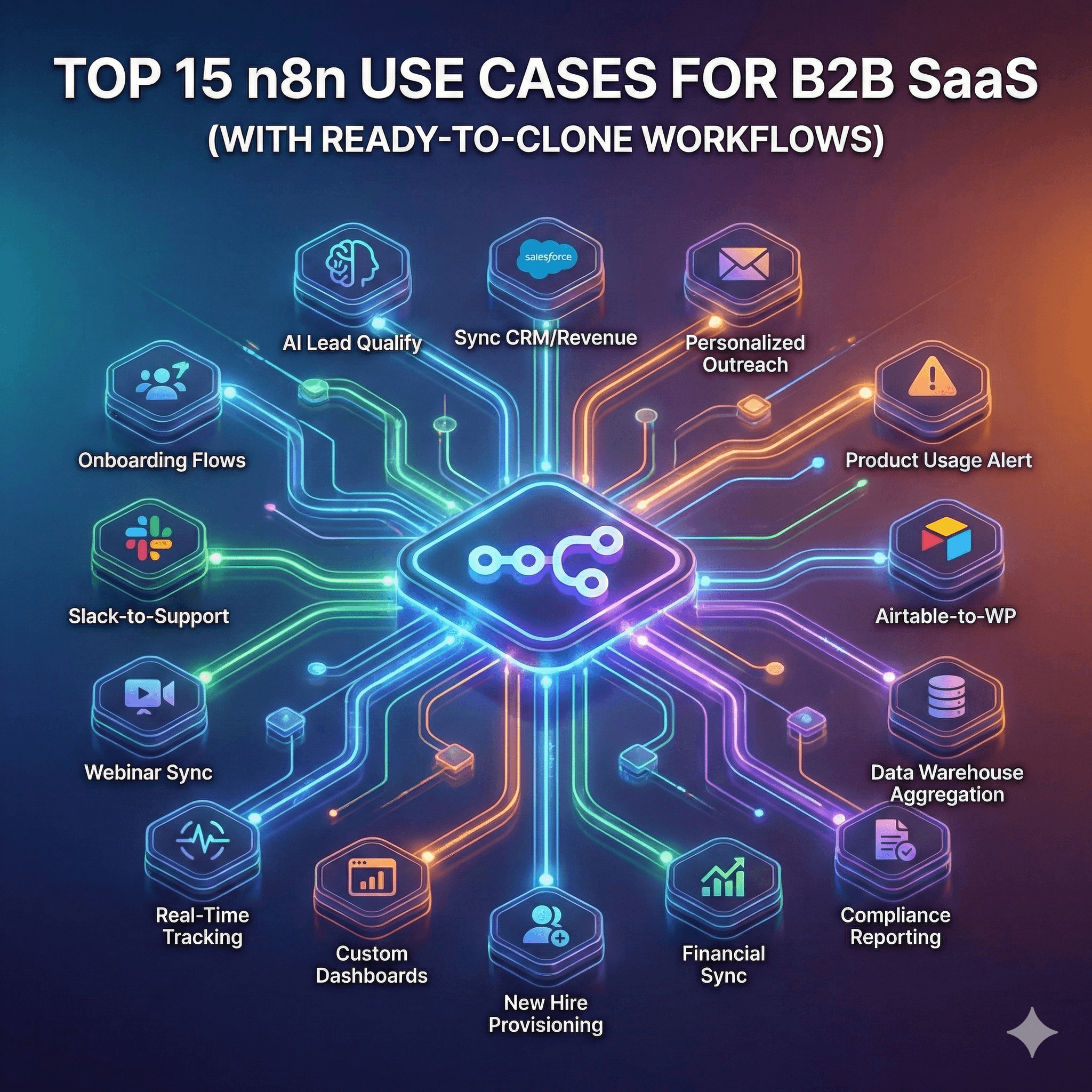
Top 15 n8n Use Cases for B2B SaaS (With Ready-to-Clone Workflows)
In the competitive B2B SaaS landscape of 2026, operational efficiency is no longer a luxury—it is the baseline for survival. While traditional tools often charge a "success tax" through per-task pricing, n8n has emerged as the platform of choice for SaaS teams that need to scale without exponential costs. By leveraging n8n use cases, technical teams can build deeply integrated, AI-driven systems that manage everything from the first signup to long-term retention.
These n8n workflows are designed to be practical, modular, and ready for deployment, allowing you to move beyond simple data syncing into true cognitive automation.
CRM and Sales Automation
The primary goal of sales automation in 2026 is to remove the "data entry" burden from your AEs and SDRs, allowing them to focus exclusively on high-intent conversations.
1. Auto-Qualify Inbound Leads with AI
Problem: Sales teams are often overwhelmed by low-quality signups, wasting hours manually researching companies to find "good fits."
Trigger: New submission via Typeform or website Webhook.
Process: * Fetch company data using the Clearbit or Apollo.io node.
Pass the company description and lead role to an OpenAI node to score the lead based on your Ideal Customer Profile (ICP).
Use an If Node to branch: High-score leads go to the CRM; low-score leads go to a nurture list.
Action: Create/Update record in HubSpot, notify the assigned rep in Slack with a brief summary of why the lead is high-priority.
Outcome: Reduce manual research time by 90% and ensure 100% of high-intent leads are contacted within 5 minutes.
[Workflow Diagram: A flow showing a Webhook connecting to an Enrichment node, followed by an AI Logic branch leading to HubSpot and Slack]
2. Sync Deal Stages Across CRM and Revenue Tools
Problem: Inconsistency between the CRM and billing platforms (like Stripe) leads to "ghost revenue" and inaccurate forecasting.
Trigger: Deal Stage Update in HubSpot or Salesforce.
Process: * Check if a corresponding customer exists in Stripe.
If "Closed Won," trigger the creation of a subscription or draft invoice.
Action: Update the deal status in the CRM and log the Stripe Customer ID for future reference.
Outcome: Eliminates manual billing errors and ensures the Sales and Finance teams are viewing the same truth.
3. Auto-Generate Personalized Outreach Sequences
Problem: Generic "personalized" emails (e.g., "I saw you work at [Company]") no longer work in 2026.
Trigger: New lead added to a specific Google Sheet or CRM view.
Process: * Use the HTTP Request Node to scrape the lead's latest LinkedIn post or company news.
Use an AI Agent Node to draft a 3-sentence email mentioning specific recent achievements.
Action: Push the drafted email into a Lemlist or Instantly.ai campaign for human approval.
Outcome: 3x higher response rates compared to standard templates.
Customer Success Operations
Retaining a customer is significantly cheaper than acquiring a new one. These n8n automation examples ensure your CS team is proactive rather than reactive.
4. Trigger Onboarding Workflows on Signup
Problem: The first 24 hours of a user's experience are critical, but manual onboarding is impossible to scale.
Trigger: New user record in your application database (PostgreSQL or MongoDB).
Process: * Create a dedicated onboarding folder in Google Drive.
Generate a personalized "Getting Started" checklist in Notion.
Action: Send a sequence of welcome emails via SendGrid based on the user's selected "Goal" during signup.
Outcome: Higher "Time to First Value" (TTFV) and reduced churn in the first 30 days.
[Internal Link: How to build complex SaaS onboarding flows in n8n]
5. Monitor Product Usage and Alert CSMs
Problem: Customer Success Managers often don't know a client is unhappy until they've already stopped using the product.
Trigger: A scheduled Cron Node (runs every 24 hours).
Process: * Query your analytics DB for accounts with 0 logins in the last 7 days.
Filter for "Pro" or "Enterprise" tier accounts.
Action: Send a high-priority Slack alert to the account owner and create a "Churn Risk" task in Asana.
Outcome: Proactive intervention that can save 15-20% of at-risk accounts annually.
6. Auto-Create Support Tickets from Slack Threads
Problem: Valuable feedback and support issues often get lost in Slack conversations between clients and the team.
Trigger: A specific emoji reaction (e.g., :ticket:) on a Slack message.
Process: * Extract the message text and the user who posted it.
Use AI to summarize the issue into a title and description.
Action: Create a new ticket in Zendesk or Intercom.
Outcome: 100% capture of informal support requests.
[Workflow Diagram: Slack 'Reaction Added' trigger leading to an AI Summarizer and then a Zendesk Create Ticket node]
Marketing and Content Automation
Using n8n for SaaS allows marketing teams to act like a 10-person department with just one operator.
7. Auto-Publish SEO Content from Airtable to WordPress
Problem: Moving content from a "planning" tool to a "publishing" tool is a tedious manual step that invites formatting errors.
Trigger: A record in Airtable is moved to the "Publish" status.
Process: * Fetch the Markdown content and metadata.
Pass the content to an AI node to generate meta-descriptions and alt-tags for images.
Action: Create a draft or published post in WordPress via its API.
Outcome: Simplifies the content pipeline and ensures SEO best practices are met for every post.
8. Sync Webinar Signups to Email Sequences
Problem: Leads from webinars (Zoom, Luma, or Demio) often sit in a CSV for days before being uploaded to a marketing tool.
Trigger: New attendee registration in Zoom.
Process: * Format the data for the CRM.
Tag the user with the specific webinar topic.
Action: Add the lead to a "Post-Webinar Nurture" flow in Mailchimp or Customer.io.
Outcome: Immediate follow-up while the lead's intent is at its peak.
9. Generate Weekly Performance Reports
Problem: Marketing managers spend Friday afternoons manually pulling data from GA4, Meta Ads, and LinkedIn Ads.
Trigger: Cron Node (Every Friday at 4 PM).
Process: * Fetch metrics from Google Analytics 4, Facebook Ads, and Google Ads.
Use a Code Node to calculate ROAS and WoW growth.
Action: Post a formatted summary to a Slack channel and update a "Master Stats" Google Sheet.
Outcome: Saves 2-4 hours per week per manager.
Data and Analytics Pipelines
Technical founders use n8n examples to move data without needing to build custom ETL (Extract, Transform, Load) scripts every time.
10. Aggregate Multi-Source Data into Data Warehouse
Problem: SaaS data is scattered across 20+ apps, making it impossible to get a "big picture" view.
Trigger: Hourly Schedule Node.
Process: * Poll APIs for Stripe (Revenue), HubSpot (Sales), and Intercom (Support).
Transform various date formats into a single standard.
Action: Upsert the data into BigQuery, Snowflake, or a Supabase database.
Outcome: Enables real-time BI dashboards that drive better executive decisions.
11. Real-Time Event Tracking to Analytics Tools
Problem: Some events in your app aren't captured by standard tracking pixels but are critical for product development.
Trigger: Internal App Webhook (e.g., "Feature_Used_Success").
Process: * Filter for unique user IDs.
Map the event data to the Mixpanel or Amplitude schema.
Action: Push the event to the analytics platform.
Outcome: Granular product insights without slowing down your frontend with heavy tracking libraries.
12. Build Custom Dashboards with API Data
Problem: Standard dashboards are often too rigid. You want to see your "Magic Number" or "Burn Multiple" in real-time.
Trigger: Webhook or Schedule.
Process: * Calculate custom KPIs using data from your accounting tool and your CRM.
Action: Update a highly visual Airtable Interface or a Geckoboard.
Outcome: Instant visibility into the health of the business for the leadership team.
Internal Operations
Automation is the "invisible hand" that keeps your internal team running smoothly as you grow.
13. Auto-Provision SaaS Accounts for New Hires
Problem: IT spent hours setting up accounts for every new hire—often missing a few along the way.
Trigger: New employee entry in HR software (e.g., BambooHR or Gusto).
Process: * If Department = "Engineering," add to the GitHub organization.
If Department = "Sales," create a Salesforce seat.
Action: Create a Google Workspace account and invite the user to relevant Slack channels.
Outcome: Reduces onboarding "dead time" for new hires from 2 days to 0 minutes.
14. Sync Financial Data Between Stripe and Accounting Tools
Problem: Reconciling thousands of micro-transactions in QuickBooks or Xero is a manual nightmare.
Trigger: Stripe Payout Succeeded.
Process: * Fetch all individual charges included in that payout.
Categorize them by product or region.
Action: Create corresponding sales receipts in QuickBooks Online.
Outcome: Accurate, audit-ready books with zero manual reconciliation.
15. Automated Compliance Reporting Workflows
Problem: SOC2 or HIPAA compliance requires regular audits of logs and permissions—tasks that are easily forgotten.
Trigger: Monthly Schedule Node.
Process: * Audit user lists from your database and your cloud provider.
Identify any accounts that haven't been used in 90 days.
Action: Generate a PDF report of findings and email it to the compliance officer.
Outcome: Continuous compliance without the "crunch" before an official audit.
Conclusion
The power of n8n use cases lies in their flexibility. While Zapier might be enough for a single-step trigger, n8n allows B2B SaaS companies to build sophisticated, multi-stage "brain systems" that handle the heavy lifting of operations.
Start with one high-impact workflow—perhaps qualifying leads or monitoring churn—and once you see the reliability of n8n workflows, you can begin to weave automation into every fiber of your organization.
Want these workflows built and customized for your SaaS? Chronexa.io delivers turnkey n8n automation for growing companies. Book a scoping call to start your automation journey today.
About author
Ankit is the brains behind bold business roadmaps. He loves turning “half-baked” ideas into fully baked success stories (preferably with extra sprinkles). When he’s not sketching growth plans, you’ll find him trying out quirky coffee shops or quoting lines from 90s sitcoms.

Ankit Dhiman
Head of Strategy
Subscribe to our newsletter
Sign up to get the most recent blog articles in your email every week.