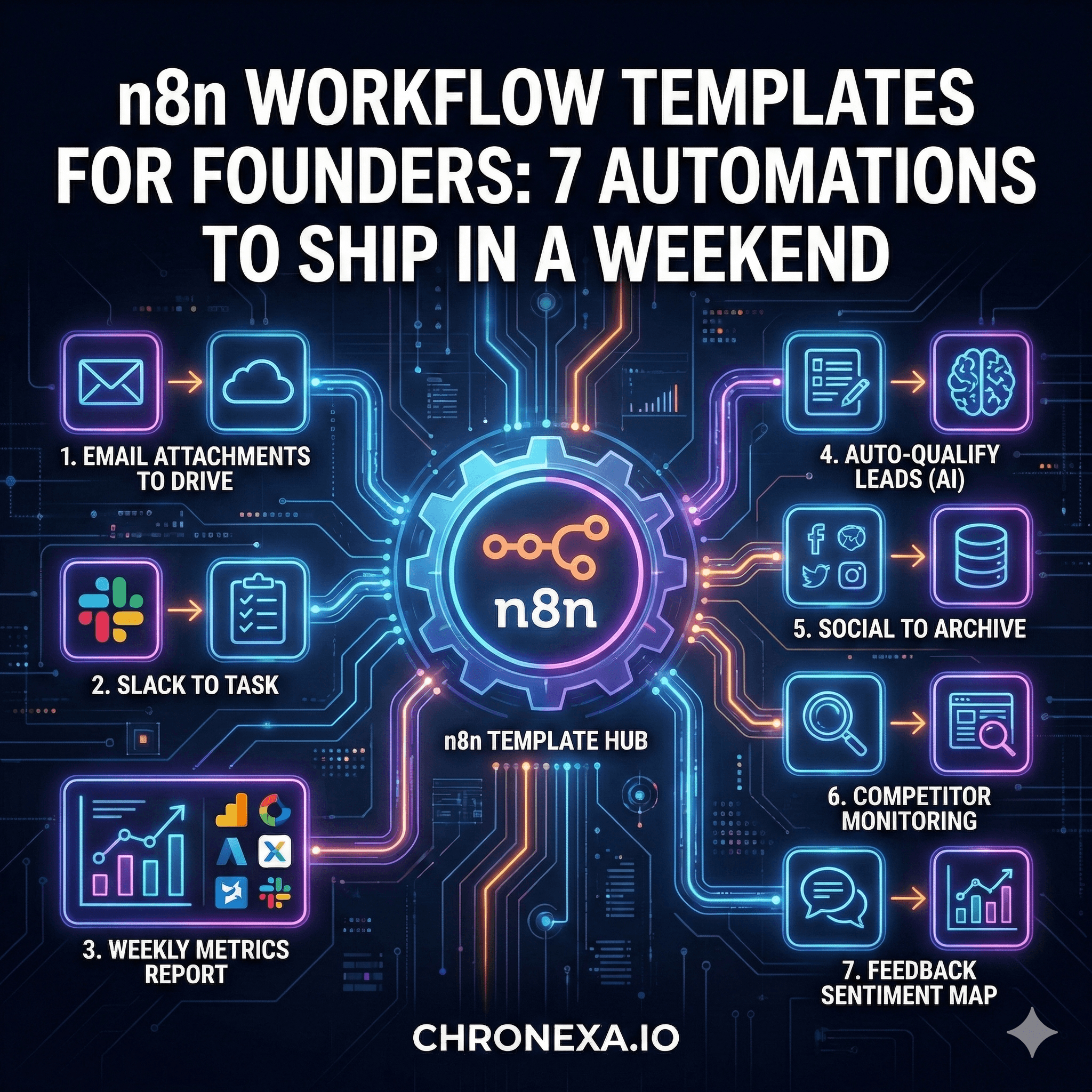
n8n Workflow Templates for Founders: 7 Automations to Ship in a Weekend
As a founder, your time is your most valuable asset, yet it is often consumed by "digital busywork"—moving data between spreadsheets, hunting for email attachments, or manually compiling weekly reports. The 80/20 rule of productivity applies perfectly here: 7 key automations can often reclaim 10+ hours of your work week.
By using n8n templates, you don't need to be a software engineer to build institutional-grade systems. These ready-made n8n workflows are designed for high impact and low complexity, allowing you to "ship" your internal automation stack in a single weekend.
Before You Start
To get the most out of these n8n workflow templates, you will need an active n8n account (n8n Cloud is the easiest for beginners) and the API keys for the tools you use daily.
Accessing Templates: You can find thousands of n8n automation templates in the n8n Library. Simply copy the JSON and paste it into your canvas.
The 5-Minute Checklist: Ensure you have your "Credentials" set up in n8n for Gmail, Slack, and your CRM before you start building.
Workflow 1: Auto-Save Email Attachments to Google Drive
The Problem: Important proposals, contracts, and invoices get buried in deep email threads, making them impossible to find during tax season or audits.
Setup Time: 15 minutes.
Tools: Gmail + Google Drive.
The Workflow:
Trigger: New email in Gmail with an attachment (you can filter by "Label" like "Invoices").
Logic: Extract the binary data (the file).
Action: Upload the file to a specific "Finance" or "Legal" folder in Google Drive.
Workflow 2: Slack Message to Task in Project Tool
The Problem: You’re in a deep flow state, someone Slacks you a request, you say "Sure!", and then you completely forget about it 10 minutes later.
Setup Time: 10 minutes.
Tools: Slack + Notion (or Asana/ClickUp).
The Workflow:
Trigger: A specific "Emoji Reaction" (like a ✅ or 📥) on a Slack message.
Logic: n8n pulls the text of that specific message.
Action: Create a new database item in Notion with the message text as the task name.
Workflow 3: Weekly Metrics Report from Multiple Tools
The Problem: Spending every Monday morning logging into Stripe, Google Analytics, and HubSpot just to see if the business grew last week.
Setup Time: 30 minutes.
Tools: Stripe + Google Analytics + HubSpot → Slack.
The Workflow:
Trigger: Schedule Node (Every Monday at 9:00 AM).
Logic: Fetch "New Revenue" from Stripe, "Site Visits" from GA4, and "New Leads" from HubSpot.
Action: Format these into a single Slack message: "Good morning! Last week we did $X in sales with Y new visitors."
Workflow 4: Auto-Qualify and Route New Leads
The Problem: Your calendar is filled with "discovery calls" with people who aren't actually your target customers.
Setup Time: 25 minutes.
Tools: Typeform + AI Enrichment + HubSpot.
The Workflow:
Trigger: New Typeform submission.
Logic: Send the company name to an AI node to find their industry and team size.
Action: If they meet your criteria (e.g., >10 employees), create a deal in HubSpot and alert you. If not, send them a polite "not a fit" email automatically.
Workflow 5: Social Media Post to Newsletter Archive
The Problem: You write great content on LinkedIn or X, but it disappears into the feed "memory hole" after 24 hours.
Setup Time: 15 minutes.
Tools: Twitter/LinkedIn + Notion.
The Workflow:
Trigger: Your account publishes a new post.
Logic: Extract the text and any links.
Action: Save it to a "Content Archive" in Notion, auto-tagged by the keywords found in the post.
Workflow 6: Daily Competitor Monitoring
The Problem: You’re the last to know when a competitor changes their pricing or launches a new feature.
Setup Time: 20 minutes.
Tools: RSS/Web Scraper + OpenAI + Slack.
The Workflow:
Trigger: Daily Schedule.
Logic: Scrape the competitor's blog or "Pricing" page. Use AI to compare it to yesterday's version.
Action: If a change is detected, Slack you a summary: "Competitor X just added a 'Pro' tier at $99/mo."
Workflow 7: Customer Feedback to Airtable Dashboard
The Problem: "The users are complaining about the UI" is a vague sentiment until you actually see the data organized in one place.
Setup Time: 20 minutes.
Tools: Intercom/Email + OpenAI + Airtable.
The Workflow:
Trigger: New support ticket or email.
Logic: AI analyzes the sentiment (Happy/Neutral/Angry) and categorizes it (Bug/Feature Request/Pricing).
Action: Log it in Airtable to create a "Voice of the Customer" dashboard.
Your Weekend Implementation Plan
Don't try to do all of these at once. Follow this schedule for a stress-free "Automation Weekend":
Time | Goal | n8n Templates to Ship |
Sat Morning | Low-Hanging Fruit | Workflows 1, 2, and 3 |
Sat Afternoon | Growth & Sales | Workflows 4 and 5 |
Sunday | Intelligence & Ops | Workflows 6 and 7 |
Sunday Eve | Testing | Send test data through all 7 flows |
Total Time Budget: 3–4 hours.
[Internal Link: Top 15 n8n use cases for growing SaaS companies]
Next Steps After Your First 7
Once these simple n8n automations are running, you’ll start seeing the world in "triggers" and "actions."
Identify Friction: Look for any task you do more than three times a week. That is your next candidate.
Join the Community: The n8n Forum is full of founders sharing beginner n8n workflows and advanced tricks.
Know When to Outsource: Once you need custom code or complex "multi-agent" AI, it might be time to bring in experts so you can stay focused on vision.
Conclusion
The compound effect of these small n8n workflow templates is massive. Reclaiming just 15 minutes a day via automation adds up to nearly two full work weeks per year. By starting with these n8n examples for beginners, you are building a scalable foundation that grows alongside your company.
Written by Ankit Dhiman — Founder & CEO at Chronexa. Ankit leads a lean team of n8n automation engineers building production-grade AI workflows for mid-market B2B companies across fintech, legal, SaaS, and operations. Book a free 30-minute strategy call to see what's possible for your team.
Related Articles
About author
Ankit is the brains behind bold business roadmaps. He loves turning “half-baked” ideas into fully baked success stories (preferably with extra sprinkles). When he’s not sketching growth plans, you’ll find him trying out quirky coffee shops or quoting lines from 90s sitcoms.

Ankit Dhiman
Head of Strategy
Subscribe to our newsletter
Sign up to get the most recent blog articles in your email every week.