There's a Direct Mobile Number Sitting in Your SDR's Unread Inbox Right Now
An OOO reply came in at 11:23 AM. It reads:
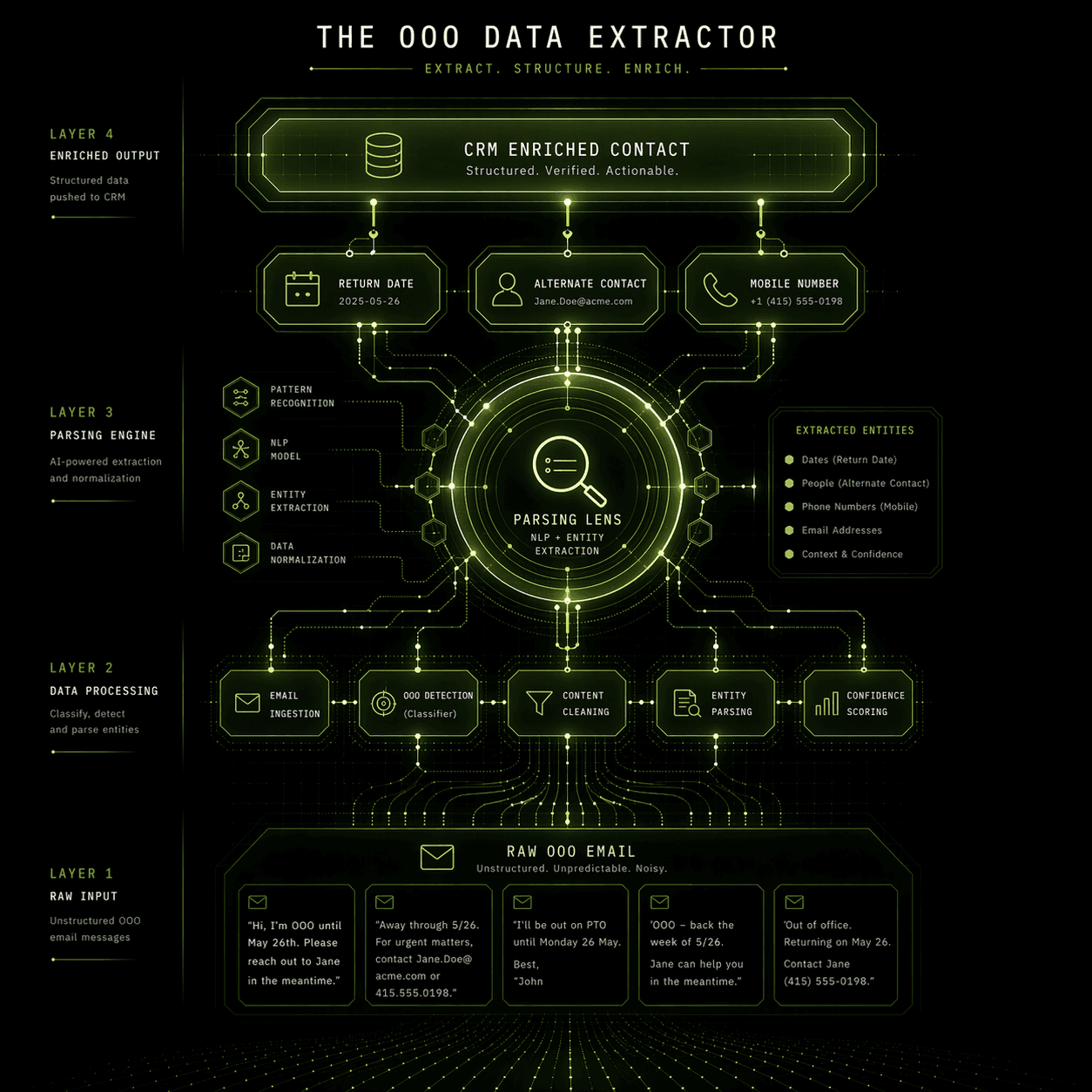
"I'm out of the office until April 28th. For urgent matters, please contact my colleague Marcus Webb, VP of Revenue Operations, at marcus.webb@tar****.com or +1 (415) 882-***."
Marcus Webb is a VP of RevOps — exactly the persona your sequence was targeting. His direct mobile is sitting in plain text in a reply email. The return date of the original contact is explicit. This is intelligence that a good SDR would act on in under two minutes: pause the original sequence, add Marcus as a new contact, log the mobile, set a follow-up task for April 29th.
Instead, the reply is sitting unread in a shared Gmail inbox alongside 340 other OOO messages from the past three months. Nobody built the process for handling these systematically. So the intelligence rots.
This isn't a prioritization failure — it's a systems failure. At any company running meaningful outbound volume, the manual overhead of processing OOO replies correctly is genuinely prohibitive. The fix is a fully automated parsing workflow that catches every OOO reply, extracts the embedded intelligence with an LLM, and writes it into your CRM and sequencing tool without a human ever touching the email.
What OOO Replies Actually Contain
Before the architecture, the full scope of intelligence in a typical OOO reply:
Return date — tells you exactly when to resume outreach. Contacting someone the day they return from a two-week vacation, before their inbox is cleared, is 3x more likely to get a response than a cold follow-up 10 days later when they've mentally moved on.
Referral contact name and title — the person they've delegated to is, by definition, authorized to handle whatever your prospect handles. In a B2B context, that's often a peer or direct report who has decision-making authority during the absence.
Referral email and direct mobile — direct mobile numbers are gold in outbound. They're rarely in Apollo's database because they're not scraped from public profiles. They appear voluntarily in OOO messages because the sender is trying to be helpful. Your competitors aren't capturing them.
Contextual signals — phrases like "I'm attending [Conference Name]" tell you where your prospect is this week. "I'm on parental leave until July" tells you the timeline is genuinely long and you should focus effort elsewhere.
None of this requires inference. It's all stated explicitly. You just need a system that reads it.
The Architecture: OOO Parsing Workflow in n8n
Layer 1: Email Trigger and Initial Triage
Your sending subdomains (or SDR inboxes if you're not yet on a subdomain architecture) receive replies into a monitored inbox. Connect that inbox to n8n via the Gmail node (using OAuth, polling every 5 minutes) or Microsoft Outlook node for O365 environments.
The first Function node performs a lightweight pre-filter before the LLM call — you don't want to process every reply through OpenAI, only OOO candidates:
If is_ooo === false, the workflow routes to your standard reply-handling branch — positive intent flagging, negative reply suppression, etc. If is_ooo === true, it advances to the LLM extraction node.
This pre-filter matters at scale. If you're running 3,000+ emails per month across multiple senders, processing every single reply through an LLM node adds latency and API cost. The keyword filter handles ~95% of OOO identification and leaves the LLM doing only the extraction work it's actually suited for.
Layer 2: LLM Extraction via OpenAI Function Call
The OpenAI node receives the full email body and returns structured JSON. Use the function calling capability, not a plain completion — it enforces the output schema and eliminates parsing failures from unstructured responses:
A real output for the Marcus Webb example would return:
Cost note: GPT-4o processes a typical 200-word OOO email body for approximately $0.001–0.003 per call. At 500 OOO replies per month, that's under $2.00 in API costs. There is no reason to use a cheaper model for this — GPT-4o's accuracy on structured extraction is meaningfully better than GPT-3.5 on ambiguous OOO formats (multi-language, poorly formatted, forwarded chains), and the accuracy difference is worth the cost differential at any reasonable outbound volume.
Layer 3: Salesforce CRM Updates
With structured data extracted, the workflow executes three parallel Salesforce operations via the Salesforce node or HTTP Request nodes:
Update the original Contact record:
Create a new Contact record for the referral (if referral_email is not null and doesn't already exist in Salesforce — check via SOQL query first):
If no record exists, create it with LeadSource = "OOO Referral" and link it to the same Account. The LeadSource value is important — after 90 days, you'll want to know how many of your pipeline contacts came from OOO extraction to quantify the ROI of this workflow.
Create a follow-up Task on the original Contact due the day after their return date:
Layer 4: Apollo Sequence Pause
Immediately after the Salesforce writes, the workflow fires an Apollo API call to pause the active sequence for the original contact:
Identify the active campaign ID, then:
Store the resume_date (return date + 1 day) in a PostgreSQL tracking table: ooo_pause_queue. A separate n8n scheduled workflow runs every morning, queries the table for resume_date = today, and re-activates the Apollo sequence for each contact whose return date has passed.
This is the piece most teams skip: they pause the sequence but never build the resume trigger. The contact sits paused indefinitely, which is only marginally better than sending while they're away. The resume automation closes the loop.
Layer 5: Referral Enrollment Decision
If the LLM extracted a referral contact who is now a new Salesforce record, the workflow runs a qualification check before automatically enrolling them in a sequence:
The "OOO Referral Outreach" Apollo sequence should open with a reference to the original contact: "I've been in conversation with [Name] about [topic] — she mentioned you'd be the right person to connect with while she's away." That opener has a dramatically higher reply rate than a cold introduction because it carries borrowed credibility from an existing relationship.
What This Workflow Produces at Scale
For a team sending 2,500 emails per month, a conservative 8% OOO rate means 200 OOO replies per month. Without automation, those 200 replies generate approximately zero structured data captures because the manual effort is too high to do consistently.
With this workflow running:
200 return dates logged to Salesforce and scheduled for re-engagement
~60–80 referral contacts created (assuming ~35% of OOO replies contain a referral)
~20–30 senior referrals auto-enrolled in targeted sequences
0 hours of SDR time spent on data entry
The referral contact pipeline alone justifies the build time. Senior referrals identified through OOO parsing typically convert at 2–4x the rate of cold-prospected contacts at the same account — because they arrived through a warm introduction path, even if that introduction was automated.
Your Outbound Stack Is Generating Intelligence You're Not Using
Every reply inbox in your outbound motion contains signal that should be feeding your CRM, your sequences, and your follow-up cadence. OOO replies are the most structured and highest-density example — but the same parsing architecture applies to positive replies, objection replies, and competitor mentions.
Chronexa builds custom outbound parsing workflows for revenue teams that want to extract actionable intelligence from every incoming reply automatically. The engagement starts with a reply inbox audit — we map every reply type your sending domains currently receive, classify the intelligence embedded in each, and build the extraction and routing logic specific to your CRM and sequencing stack.
If your SDRs are manually processing reply inboxes for more than 30 minutes per day, that audit will quantify exactly what's being missed and what the automation saves.
Book the outbound parser design session here
— bring your current reply handling process and we'll show you what it should look like.
Written by Ankit Dhiman — Founder & CEO at Chronexa. Ankit leads a lean team of n8n automation engineers building production-grade AI workflows for mid-market B2B companies across fintech, legal, SaaS, and operations. Book a free 30-minute strategy call to see what's possible for your team.
Related Articles
Top 10 AI Automation Agencies for B2B SaaS (2026 Review & Rankings)
Top 15 n8n Use Cases for B2B SaaS (With Ready-to-Clone Workflows)
How GCC Family Offices Use AI Agents to Cut Ops Costs by 40%
Ready to transform your operations?
Chronexa builds autonomous agentic systems and AI workflows that drive real ROI. Explore our AI Document Processing, Sales & Revenue Operations, or Custom AI Workflows services today.
About author
Ankit is the brains behind bold business roadmaps. He loves turning “half-baked” ideas into fully baked success stories (preferably with extra sprinkles). When he’s not sketching growth plans, you’ll find him trying out quirky coffee shops or quoting lines from 90s sitcoms.

Ankit Dhiman
Head of Strategy
Subscribe to our newsletter
Sign up to get the most recent blog articles in your email every week.