These leads aren't saying "no"; they are simply vanishing into the cracks of your tech stack. They are the demo requests that sit in a shared inbox for six hours because the SDR is at lunch. They are the webinar registrants trapped in a Zoom CSV export that no one uploaded to Salesforce. They are the "Contact Us" submissions that failed to sync because of a dropdown field mismatch.
In a market where Customer Acquisition Cost (CAC) is rising, 20% leakage is not an operational oversight; it is a revenue crisis. You are effectively setting fire to one out of every five dollars in your marketing budget.
The solution isn't to hire more SDRs to watch the inbox. The solution is to build an automated, hermetically sealed lead capture system that guarantees 100% throughput from "Submit" to "Sales."
Where Leads Get Lost: The "Black Holes" of SaaS
Why does leakage happen? In our experience auditing SaaS stacks, it is rarely a single catastrophic failure. It is death by a thousand cuts.
The "Speed to Lead" Gap: A prospect requests a demo. If your process relies on a human seeing an email notification and manually creating a lead in HubSpot, you have already lost. Data shows that responding within 5 minutes increases conversion odds by 9x. If your lead sits for 6 hours, they have already booked a demo with your competitor.
The Event Data Silo: You run a LinkedIn Live or a Zoom webinar. The registrants are in the event platform, not your CRM. It takes a marketing manager three days to download the CSV, clean the columns, and upload it. By then, the "heat" of the moment is gone.
The Context Void: A lead arrives with just an email address:
john@acme.com. The sales rep ignores it because it looks low-quality. If they had known Acme Inc. just raised a Series B and John is the VP of Engineering, they would have called immediately. Lack of enrichment kills conversion.The Duplicate Disaster: A past customer re-converts on a new ebook. Your system creates a duplicate lead record instead of alerting the Account Manager who owns the existing relationship. The new lead gets routed to a junior SDR who creates an awkward, redundant conversation.
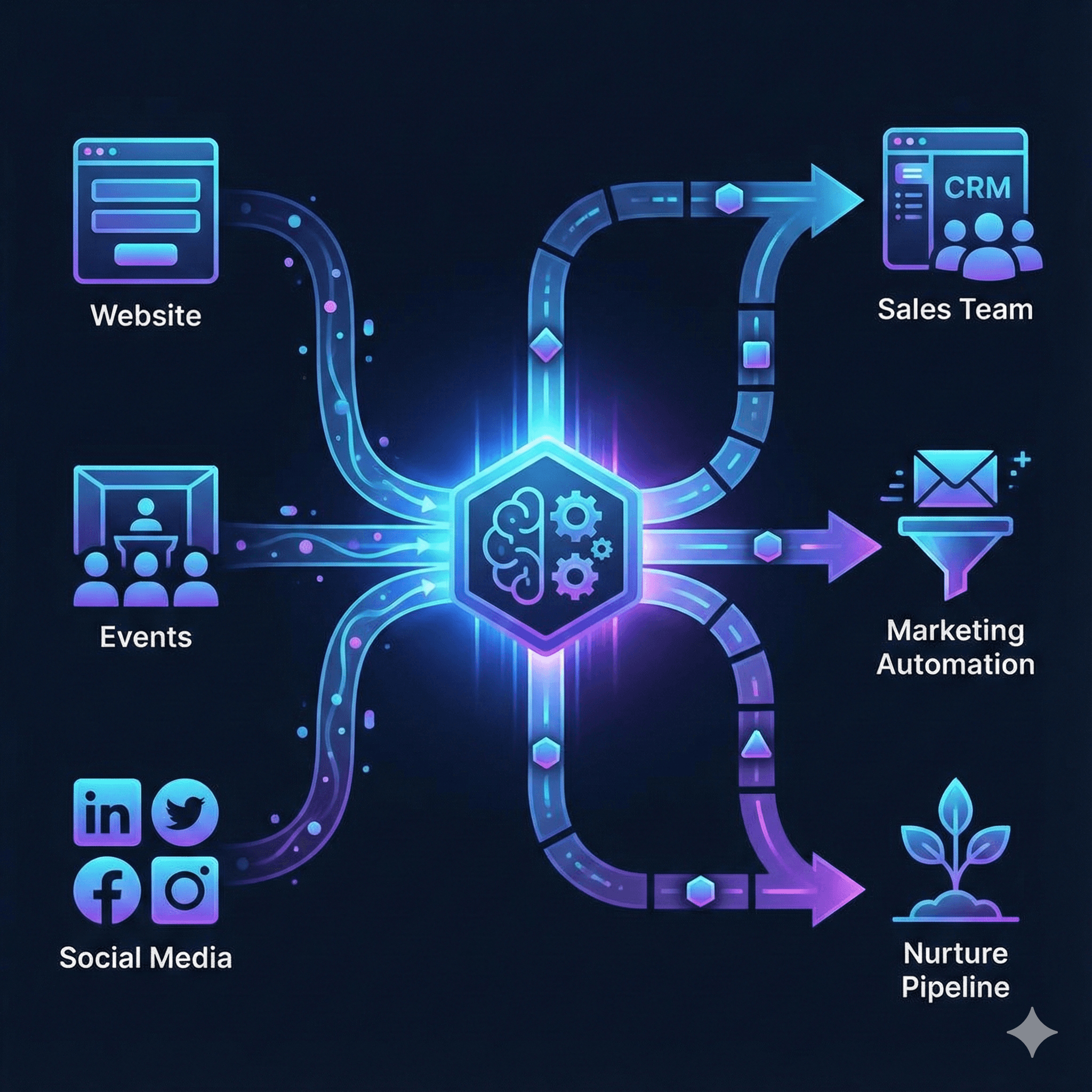
The Architecture: A "Zero-Leak" Capture System
At Chronexa, we don't rely on fragile, point-to-point integrations (like a simple Zapier generic connection) for mission-critical revenue infrastructure. We build robust orchestration layers using n8n, Airtable, and HubSpot/Salesforce.
Here is the 5-component architecture of a system that stops the leaks.
Component 1: Multi-Source Ingestion
We build a unified "listener" workflow in n8n. Whether the lead comes from a Webflow form, a LinkedIn Lead Gen Form, a Typeform survey, or a Calendly booking, they all flow into a single standardization pipeline.
The Fix: No more CSV exports. Every source pushes data via webhook instantly.
Component 2: Real-Time Enrichment (Before Routing)
Before the lead ever touches the CRM, we pass the email address through an enrichment API (like Clearbit, Apollo, or People Data Labs).
The Logic: The workflow queries the API: "Who is
j.smith@techflow.io?"The Return: The API returns: "Job Title: CTO. Company Size: 200 employees. Industry: Fintech. Technologies used: AWS, Stripe."
The Value: Now we aren't routing a name; we are routing a qualified profile.
Component 3: The "Traffic Cop" Routing Logic
This is where RevOps earns its keep. Once enriched, the automation applies a decision tree to route the lead intelligently.
The Routing Decision Tree:
Is it a current customer? -> Stop. Alert the Account Manager (CSM) via Slack. Do not create a new sales lead.
Is it a Target Account? -> Priority High. Route directly to the Enterprise AE assigned to that territory.
Is it an unqualified lead (e.g., "Student" or <10 employees)? -> Route to Nurture. Send to a marketing email sequence. Do not distract sales.
Is it a standard qualified lead? -> Round Robin. Assign to the next available SDR.
Component 4: Slack Alerts That Matter
Sales reps ignore automated emails. They live in Slack. But if you alert them about everything, they ignore that too.
We configure the automation to fire "Red Alert" notifications only for high-intent signals.
The Alert: "🚨 HOT LEAD: VP of Ops at a $50M Fintech just requested a demo. Source: Pricing Page. Enriched Stack: Uses Competitor X."
The Button: The Slack message includes a "Claim Lead" button that updates Salesforce instantly.
Component 5: Automatic Deduplication & Merge
The workflow checks your CRM for existing matches by email domain or fuzzy name matching before creating a new record. If a match is found, it updates the existing record with the new activity (e.g., "Downloaded Whitepaper") and tasks the record owner, keeping your data hygiene pristine.
The Results: Revenue You Can Measure
We deployed this exact architecture for a US-based SaaS company in the project management space. They were processing ~300 inbound leads a month manually.
Here is the before-and-after reality:
Lead Capture Rate: Improved from ~70% to 99.8%. We discovered that nearly 30% of their "Contact Us" form fills were failing silently due to a legacy API error that no one noticed. The automation now logs every failure and alerts IT instantly.
Speed to Contact: Reduced from an average of 4+ hours to 8 minutes. Because enrichment happens instantly, SDRs have the phone number and context ready immediately.
Sales Satisfaction: The sales team stopped complaining about "junk leads." Because the automation filters out students and bad fits before they hit the CRM, the reps know that if they get a notification, it is worth their time.
Cost Efficiency: The entire system runs on n8n and existing CRM/Data subscriptions. The cost of the automation infrastructure is roughly $500/month. The alternative was hiring a dedicated RevOps specialist ($3K-$6K/month) just to manage data hygiene and routing.
Build It Yourself: The 2-Week Sprint
You don't need a massive engineering team to build this. You can implement a V1 in two weeks.
Week 1: The Core Pipeline
Start with your top 3 lead sources (usually your "Request Demo" form, your main lead magnet, and your "Contact Sales" form). Build the n8n workflow to ingest these webhooks and map them cleanly to your CRM fields. Do not worry about complex routing yet—just ensure 100% delivery.
Week 2: Enrichment and Routing
Add the API step. Connect Clearbit or Apollo. Then, build your basic routing logic (e.g., "If >50 employees, send to Account Executive; else send to SDR").
A Warning on "Over-Building"
Don't try to account for every edge case. If a lead comes in with a weird email format, just route it to a "Manual Review" channel in Slack. Automate the 90% standard flow first.
Stop the Bleeding
Your marketing team is working too hard to generate demand for your operations stack to lose it. A lead capture system is the bridge between "Interest" and "Revenue." If that bridge has holes, you are losing money every single hour.
Building a hermetic, automated capture system is the highest-ROI activity a SaaS Growth team can undertake. It pays for itself with the first saved Enterprise deal.
Get a Lead Capture Audit We will trace a test lead through your system and show you exactly where the data breaks or delays.
About author
Ankit is the brains behind bold business roadmaps. He loves turning “half-baked” ideas into fully baked success stories (preferably with extra sprinkles). When he’s not sketching growth plans, you’ll find him trying out quirky coffee shops or quoting lines from 90s sitcoms.

Ankit Dhiman
Head of Strategy
Subscribe to our newsletter
Sign up to get the most recent blog articles in your email every week.